How would you know whether your Facebook campaigns are working? Is your audience responding? Are they converting? Understanding these things is crucial to growing your business page and generating more leads and conversions.
Facebook Analytics could help you understand your audience's behavior. But it is no longer accessible. So how do you get access to your audience insights in 2023?
Don’t worry. This blog post will take you through everything you need to know about Facebook Analytics. Plus, you will also learn about the different analytics tools available and how you can use them for your business.
Let’s get started!
What happened to Facebook Analytics?
Facebook Analytics stopped being available to users on the 1st of July 2021. So, business owners running their Facebook pages can no longer access this analytics feature.
Facebook didn’t explain why it shut down analytics. But, it has offered a new solution for your business — the company has recommended people shift their analytics efforts to three tools. Let’s look at each of these tools and how to use them.
Note: As Facebook is changing its name to Meta, it sometimes replaces the word "Facebook" for "Meta" when discussing these tools. We have chosen to use "Facebook" in this article to simplify things for you.
Facebook Business Suite offers insights into your organic and paid social media efforts on Facebook and Instagram.
It shows you visual reports and metrics to help you understand what's working for your Facebook page and what’s not. Thus, you can optimize your time and resources to get the best results from Facebook.
Facebook Business Suite works from a single dashboard.
How to locate Facebook Business Suite
Follow these simple steps to access Facebook Business Suite:
Log into Facebook with your business account.
You will automatically get redirected to Facebook Business Suite when you open your Facebook Business account on a desktop computer. Or, if you are using the Pages Manager app on your mobile phone, you will automatically get a notification to download Facebook Business Suite if you haven't already.
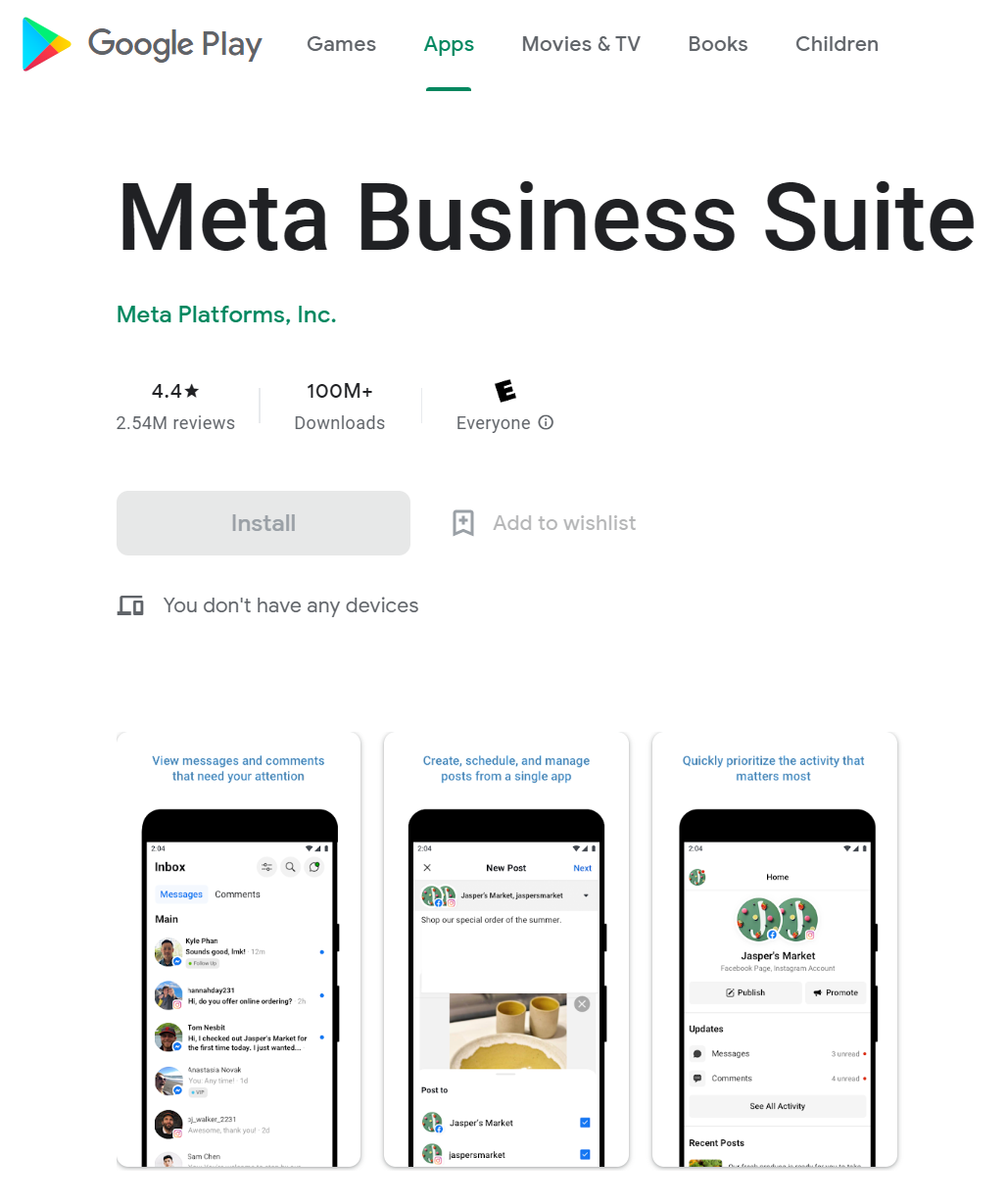
You can download the Facebook Business Suite app from the Google Play store or the Apple App Store.
What metrics can you track with Meta Business Suite?
Facebook Business Suite monitors many metrics to analyze the performance of your posts and activities on the platform. Here are some metrics it can track:
Reach (Organic vs. Paid) — Your organic reach denotes how many people viewed your content without running paid campaigns. The paid reach shows the number of people who saw your post after you paid to boost it.
Comparing the two will help you understand whether you need to change your marketing budget.
Engagement — This is the ratio of the number of people who saw your post to the number of people who interacted with it. The interaction can be in any form — likes, comments, shares, or clicks.
You will see it expressed as a percentage.
Impressions — This denotes the number of times your post appeared on the screen of a Facebook user. Unlike reach, it includes views from people who have seen the content before.
Likes — This shows the number of people who have liked your post or reacted to it. Tracking this metric is crucial to understanding how your audience feels about your ads and content. Facebook users show their affections through likes and reactions.
Comments — This shows the number of comments on your post. A higher number of comments shows your content is super engaging.
Followers — This metric tells you the number of new followers you have gained from a post. Thus, it helps you understand how many people have decided to come back and check out your page from each post.
Audience demographics — Understanding your audience’s response is not enough. You also need to know who your audience members are. This metric will show you the demographics of your audience, including their location, age, and gender. Plus, it will also show you their interests and preferences. You can use it to tailor your future campaigns to your audience’s needs and interests.
Ad account’s spend — This is a super important metric because it shows you how much money you spent to achieve the results you got. That will help you decide if you need to revise your Facebook marketing budget.
Facebook Ads Manager is the one-stop solution for managing all your ads on Facebook and Messenger. It lets you create ads, decide when and where they will run, and track their performance.
It is an invaluable tool for marketers who need thorough data on their ad performance. You can view all your ads on the Ads Manager dashboard — no matter whether they are still running or not.
How to locate Facebook Ads Manager?
Follow these simple steps to access Facebook Ads Manager:
Log in to your Facebook Business account.
Visit "Ads Manager."
Click on the nine-dot menu on the left side of the screen.
Select "Ads Reporting."
What metrics can you track with Facebook Ads Manager?
Facebook Ads Manager lets you track crucial metrics for your ad campaigns like these:
Results archived — This includes the number of leads generated, conversions, and event responses.
Reach — This denotes the number of people who have viewed your ad. Thus, this metric helps you understand how eye-catching your ad is.
Impressions —The number of impressions shows the number of times your ad appeared on users' screens. Note that an impression doesn't mean someone noticed your ad, just that it was shown to them.
Frequency — This shows the number of times each user sees your ad on Facebook or Instagram. Frequency denotes whether your campaign is running well.
Relevance Score — This measures how relevant Facebook thinks your ad is for your target audience. Facebook uses this score to decide the cost and placement of your ad campaigns.
Clicks — This is one of the most crucial metrics. It tells you the number of clicks your ad generated.
Cost per result — This denotes the average cost of getting each result (like a click or conversion). It helps you decide whether your cost per result is justified or whether you need to modify your campaign.
Amount spent — This shows your real pocket pinch for the ad campaign.
Cost per Mille — This stands for cost per mille, or the cost a marketer pays for every 1,000 impressions of a digital ad.
If you need to download the data from any of these metrics, Facebook lets you download them as an Excel document. Just click on the download button and choose your desired format.
Facebook Events Manager is an invaluable tool if you are trying to send people to your app or website with your ads. This tool helps you track actions on third-party apps and websites outside Facebook. Thus, it’s an excellent way to track your leads and conversions.
How to locate Facebook Events Manager?
You can locate Facebook Events Manager from Ads Manager using these steps:
Log in to your Facebook Business account.
Open "Facebook Ads Manager."
Open the menu in the upper left corner.
Now choose "Events Manager" from the shortcuts offered.
What metrics can you track with Facebook Events Manager?
Facebook Events Manager helps you track metrics like these:
Page views — This shows the number of people who have viewed your page after seeing your ad. Taking such an action means these people have taken their first step towards becoming part of your loyal audience in the future.
Purchases — This tracks the number of purchases made if your ad includes a purchase link. Thus, it is the most crucial metric as it shows how successful your ad campaign is.
Leads — This shows the number of people who are interested in your company’s products or services. Your audience can show interest in several ways. For instance, they might fill out a form, take part in a survey, or download an ebook.
The number of leads generated is a significant metric for your business. It's step one in understanding how to convert leads into customers.
Buttons clicked — This is a super useful metric as it shows the specific buttons your audience clicked. For instance, did they click the "Subscribe" or "Send a Message" button? This metric helps you understand how your audience wants to interact with your brand.
What else can you do with Facebook Events Manager?
Facebook Events Manager also provides you with a few other options:
Connect data sources — You can have three types of data sources:
Web — This data source is crucial for eCommerce stores. It automatically gets tracked by Facebook Pixel. For some ideas on what to do with this data, read "14 Important eCommerce Metrics To Track."
App — You can add data sources that let you track activity within mobile apps. This is crucial if you are looking to increase app downloads.
Offline — Offline sources include things like in-store purchases and offline lead generation.
Add custom conversions — Conversions involve events when people from your audience become your customers. For example, making a purchase, donating, or subscribing. Now, these events get covered under Facebook’s standard conversion events.
But if you want to track events that don’t appear in the list of standard events, you can add custom conversions. Event Manager lets you add up to 100 custom conversion events per account.
Set up partner integrations — This includes any third-party tools and software you can use to install, manage, and run Facebook Events Manager.
Get better Facebook analytics with Triple Whale
Now, you don’t have to worry just because Facebook has removed Facebook Analytics. It has suggested three amazing tools that you can use to track your metrics and reach your marketing goals instead.
You can use Facebook Business Suite, Ads Manager, and Events Manager to monitor how your audience interacts with your campaigns. These nifty tools help you evaluate whether your campaigns are bringing any real results or not.
If you'd like to smarten up your Facebook analytics process, try Triple Whale. Triple Whale lets you track all your metrics in one place and gives you better attribution on Facebook, especially in the wake of IOS14. Get in touch today.
Component Sales
5.32K
Benchmark your ecommerce brand against industry leaders
How would you know whether your Facebook campaigns are working? Is your audience responding? Are they converting? Understanding these things is crucial to growing your business page and generating more leads and conversions.
Facebook Analytics could help you understand your audience's behavior. But it is no longer accessible. So how do you get access to your audience insights in 2023?
Don’t worry. This blog post will take you through everything you need to know about Facebook Analytics. Plus, you will also learn about the different analytics tools available and how you can use them for your business.
Let’s get started!
What happened to Facebook Analytics?
Facebook Analytics stopped being available to users on the 1st of July 2021. So, business owners running their Facebook pages can no longer access this analytics feature.
Facebook didn’t explain why it shut down analytics. But, it has offered a new solution for your business — the company has recommended people shift their analytics efforts to three tools. Let’s look at each of these tools and how to use them.
Note: As Facebook is changing its name to Meta, it sometimes replaces the word "Facebook" for "Meta" when discussing these tools. We have chosen to use "Facebook" in this article to simplify things for you.
Facebook Business Suite offers insights into your organic and paid social media efforts on Facebook and Instagram.
It shows you visual reports and metrics to help you understand what's working for your Facebook page and what’s not. Thus, you can optimize your time and resources to get the best results from Facebook.
Facebook Business Suite works from a single dashboard.
How to locate Facebook Business Suite
Follow these simple steps to access Facebook Business Suite:
Log into Facebook with your business account.
You will automatically get redirected to Facebook Business Suite when you open your Facebook Business account on a desktop computer. Or, if you are using the Pages Manager app on your mobile phone, you will automatically get a notification to download Facebook Business Suite if you haven't already.
You can download the Facebook Business Suite app from the Google Play store or the Apple App Store.
What metrics can you track with Meta Business Suite?
Facebook Business Suite monitors many metrics to analyze the performance of your posts and activities on the platform. Here are some metrics it can track:
Reach (Organic vs. Paid) — Your organic reach denotes how many people viewed your content without running paid campaigns. The paid reach shows the number of people who saw your post after you paid to boost it.
Comparing the two will help you understand whether you need to change your marketing budget.
Engagement — This is the ratio of the number of people who saw your post to the number of people who interacted with it. The interaction can be in any form — likes, comments, shares, or clicks.
You will see it expressed as a percentage.
Impressions — This denotes the number of times your post appeared on the screen of a Facebook user. Unlike reach, it includes views from people who have seen the content before.
Likes — This shows the number of people who have liked your post or reacted to it. Tracking this metric is crucial to understanding how your audience feels about your ads and content. Facebook users show their affections through likes and reactions.
Comments — This shows the number of comments on your post. A higher number of comments shows your content is super engaging.
Followers — This metric tells you the number of new followers you have gained from a post. Thus, it helps you understand how many people have decided to come back and check out your page from each post.
Audience demographics — Understanding your audience’s response is not enough. You also need to know who your audience members are. This metric will show you the demographics of your audience, including their location, age, and gender. Plus, it will also show you their interests and preferences. You can use it to tailor your future campaigns to your audience’s needs and interests.
Ad account’s spend — This is a super important metric because it shows you how much money you spent to achieve the results you got. That will help you decide if you need to revise your Facebook marketing budget.
Facebook Ads Manager is the one-stop solution for managing all your ads on Facebook and Messenger. It lets you create ads, decide when and where they will run, and track their performance.
It is an invaluable tool for marketers who need thorough data on their ad performance. You can view all your ads on the Ads Manager dashboard — no matter whether they are still running or not.
How to locate Facebook Ads Manager?
Follow these simple steps to access Facebook Ads Manager:
Log in to your Facebook Business account.
Visit "Ads Manager."
Click on the nine-dot menu on the left side of the screen.
Select "Ads Reporting."
What metrics can you track with Facebook Ads Manager?
Facebook Ads Manager lets you track crucial metrics for your ad campaigns like these:
Results archived — This includes the number of leads generated, conversions, and event responses.
Reach — This denotes the number of people who have viewed your ad. Thus, this metric helps you understand how eye-catching your ad is.
Impressions —The number of impressions shows the number of times your ad appeared on users' screens. Note that an impression doesn't mean someone noticed your ad, just that it was shown to them.
Frequency — This shows the number of times each user sees your ad on Facebook or Instagram. Frequency denotes whether your campaign is running well.
Relevance Score — This measures how relevant Facebook thinks your ad is for your target audience. Facebook uses this score to decide the cost and placement of your ad campaigns.
Clicks — This is one of the most crucial metrics. It tells you the number of clicks your ad generated.
Cost per result — This denotes the average cost of getting each result (like a click or conversion). It helps you decide whether your cost per result is justified or whether you need to modify your campaign.
Amount spent — This shows your real pocket pinch for the ad campaign.
Cost per Mille — This stands for cost per mille, or the cost a marketer pays for every 1,000 impressions of a digital ad.
If you need to download the data from any of these metrics, Facebook lets you download them as an Excel document. Just click on the download button and choose your desired format.
Facebook Events Manager is an invaluable tool if you are trying to send people to your app or website with your ads. This tool helps you track actions on third-party apps and websites outside Facebook. Thus, it’s an excellent way to track your leads and conversions.
How to locate Facebook Events Manager?
You can locate Facebook Events Manager from Ads Manager using these steps:
Log in to your Facebook Business account.
Open "Facebook Ads Manager."
Open the menu in the upper left corner.
Now choose "Events Manager" from the shortcuts offered.
What metrics can you track with Facebook Events Manager?
Facebook Events Manager helps you track metrics like these:
Page views — This shows the number of people who have viewed your page after seeing your ad. Taking such an action means these people have taken their first step towards becoming part of your loyal audience in the future.
Purchases — This tracks the number of purchases made if your ad includes a purchase link. Thus, it is the most crucial metric as it shows how successful your ad campaign is.
Leads — This shows the number of people who are interested in your company’s products or services. Your audience can show interest in several ways. For instance, they might fill out a form, take part in a survey, or download an ebook.
The number of leads generated is a significant metric for your business. It's step one in understanding how to convert leads into customers.
Buttons clicked — This is a super useful metric as it shows the specific buttons your audience clicked. For instance, did they click the "Subscribe" or "Send a Message" button? This metric helps you understand how your audience wants to interact with your brand.
What else can you do with Facebook Events Manager?
Facebook Events Manager also provides you with a few other options:
Connect data sources — You can have three types of data sources:
Web — This data source is crucial for eCommerce stores. It automatically gets tracked by Facebook Pixel. For some ideas on what to do with this data, read "14 Important eCommerce Metrics To Track."
App — You can add data sources that let you track activity within mobile apps. This is crucial if you are looking to increase app downloads.
Offline — Offline sources include things like in-store purchases and offline lead generation.
Add custom conversions — Conversions involve events when people from your audience become your customers. For example, making a purchase, donating, or subscribing. Now, these events get covered under Facebook’s standard conversion events.
But if you want to track events that don’t appear in the list of standard events, you can add custom conversions. Event Manager lets you add up to 100 custom conversion events per account.
Set up partner integrations — This includes any third-party tools and software you can use to install, manage, and run Facebook Events Manager.
Get better Facebook analytics with Triple Whale
Now, you don’t have to worry just because Facebook has removed Facebook Analytics. It has suggested three amazing tools that you can use to track your metrics and reach your marketing goals instead.
You can use Facebook Business Suite, Ads Manager, and Events Manager to monitor how your audience interacts with your campaigns. These nifty tools help you evaluate whether your campaigns are bringing any real results or not.
If you'd like to smarten up your Facebook analytics process, try Triple Whale. Triple Whale lets you track all your metrics in one place and gives you better attribution on Facebook, especially in the wake of IOS14. Get in touch today.
Share
Colin Dougherty
Colin is Head of Content at Triple Whale.
Colin Dougherty
Colin is Head of Content at Triple Whale. He enjoys long walks on the beach, tequila sunrises, and a quick dip in the ocean.
Body Copy: The following benchmarks compare advertising metrics from April 1-17 to the previous period. Considering President Trump first unveiled his tariffs on April 2, the timing corresponds with potential changes in advertising behavior among ecommerce brands (though it isn’t necessarily correlated).


 Moby AIAsk questions, analyze performance, and work with your business context.
 ActionsTake governed action across the tools that run your business.
 AutomationsSchedule recurring analysis and work that runs on your terms.
 Landing PagesCreative conversion-focused ecommerce pages with Moby.
 Creative StudioGenerate and refine creative grounded in your brand.


.webp)








.webp)

.webp)
