Meta’s Facebook (and Instagram) remain one of the most powerful and favored ad platforms for ecommerce businesses, and the 3.35 billion monthly active users (as of Q4 2024) are a main reason why. But a compelling ad is only the first step, and running a successful campaign requires a deep understanding of Facebook ad analytics to measure performance, optimize campaigns, and maximize return on investment.
Facebook ads have evolved dramatically over the past few years, especially post iOS 14.5 privacy changes that introduced a limitation for tracking capabilities. The more complex marketing environment means that marketers must leverage new analytics tools and strategies in order to run the most effective campaigns and complete a Facebook ads audit.
In this guide, we’ll walk through everything you need to know about Facebook ad analytics, from understanding key metrics to implementing data-driven optimization strategies that deliver measurable results.
What is Facebook Ad Analytics?
Before diving into specific metrics, it’s important to clarify that ‘Facebook ad analytics” isn’t the name of a specific tool. Rather, it’s a comprehensive term that encompasses the various metrics, reports, and analytical approaches used to track and evaluate Facebook advertising campaign performance.
The primary tool for accessing Facebook analytics is Meta Ads Manager (formerly Facebook Ads Manager), which serves as the central hub for creating, managing, and analyzing your Facebook and Instagram ad campaigns. This platform provides access to hundreds of different metrics and reporting capabilities that help advertisers understand campaign performance.
Key components of Facebook ad analytics include:
Performance metrics like click-through rate (CTR), cost per click (CPC) and return on ad spend (ROAS)
Engagement metrics such as likes, comments, shares, and video watch time
Conversion tracking through the Meta Pixel and Conversions API
Audience insights and demographic breakdowns
Attribution reporting across different touchpoints
Understanding these analytics is crucial for making informed decisions about budget allocation, audience targeting, creative optimization, and overall campaign strategy.
The most important Facebook ads metrics to track
Meta Ads Manager offers access to more than 350 different metrics, which can be overwhelming for advertisers trying to focus on what matters most. Here are the essential metrics organized by category to help you prioritize your analysis:
Performance metrics
Click-through rate (CTR)
What it measures: The percentage of people who clicked your ad after seeing it.
How to calculate: CTR = (Clicks / Impressions) x 100
Why it matters: CTR indicates how engaging and relevant your ad is to your target audience. A higher CTR signals strong alignment between your ad content, design, and audience interests.
Cost Per Click (CPC)
What it measures: The average amount you pay each time someone clicks your ad.
How to calculate: CPC = Total Ad Spend / Total Clicks
Why it matters: CPC helps you understand the cost efficiency of driving traffic to your website or landing page.
Return on Ad Spend (ROAS)
What it measures: The revenue generated for each dollar spent on advertising.
How to calculate: ROAS = Revenue from Ads / Ad Spend
Why it matters: ROAS is often considered the most important metric as it directly ties advertising investment to business results.
Conversion metrics
Conversion Rate
What it measures: The percentage of clicks that result in a desired action (purchase, sign-up, etc.)
How to calculate: Conversion Rate = (Conversions / Clicks) x 100
Why it matters: This metric reveals how effective your landing pages and offers are at converting traffic into customers.
Cost Per Acquisition (CPA)
What it measures: The average cost to acquire a customer or complete a specific action.
How to calculate: CPA = Total Ad Spend / Number of Conversions
Why it matters: CPA helps determine if your advertising costs are sustainable relative to customer value.
Engagement metrics
Hook Rate (Thumb Stop Rate)
What it measures: The percentage of people who stop scrolling and watch your video ad for at least 3 seconds.
How to calculate: Hook Rate = (3-Second Video Plays / Impressions) x 100
Why it matters: Hook rate is crucial for video ads as it indicates how well your creative captures attention in users’ feeds. A good hook rate typically ranges from 30-45%
Hold Rate
What it measures: The percentage of people who continue watching after the initial 3 seconds, typically measured to 15 seconds.
How to calculate: Hold Rate = (15-Second Video Plays / 3-Second Video Plays) x 100
Why it matters: Hold rate indicates whether your content maintains viewer interest beyond the initial hook. High-performing ads typically have both high hook rates and high hold rates.
Reach and frequency metrics
Impressions
What it measures: The total number of times your ad was displayed.
Why it matters: Impressions can help you understand the potential reach of your campaign and can indicate if you’re reaching enough people to achieve your goals.
Frequency
What it measures: The average number of times each person saw your ad
Why it matters: Keep frequency under 3-4 to avoid ad fatigue. High frequency (5+) leads to decreased performance, higher costs, and negative feedback.
Cost Per Mille (CPM)
What it measures: The cost per 1,000 impressions
Why it matters: CPM helps evaluate the cost efficiency of reaching your target audience and can indicate auction completion levels.
How to Track Facebook Ad Analytics
Using Meta Ads Manager (Native Approach)
Meta Ads Manager is your primary tool for tracking Facebook ad analytics. Here’s how to access and customize your reporting:
Accessing Meta Ads Manager:
Log into your Facebook Business account
Navigate to Meta Ads Manager from the main menu
Select the campaign, ad set, or ad level you want to analyze
Customizing Your View:
Click on the "Columns" dropdown in the reporting interface
Select "Performance and Clicks" for basic metrics
Choose "Customize Columns" to add specific metrics like hook rate or hold rate
Save custom column sets for consistent reporting
Setting Up Key Metrics:
For Hook Rate:
Go to Customize Columns
Search for "3-second video plays"
Add both "3-second video plays" and "Impressions" to calculate the ratio
For Hold Rate:
Add "ThruPlays" (15-second video plays)
Include "3-second video plays"
Calculate the ratio: ThruPlays ÷ 3-second video plays
Advanced Tracking Options
Meta Pixel and Conversions API
Meta's integration with Google Analytics provides expanded insight into how campaigns drive traffic and user activity. This integration, combined with the Meta Pixel and Conversions API, offers more comprehensive attribution data.
Custom UTM Parameters
Meta is improving its ads creation interface by providing one-click options for suggested UTM parameters, helping identify traffic sources in Google Analytics. Proper UTM tagging ensures accurate attribution across platforms.
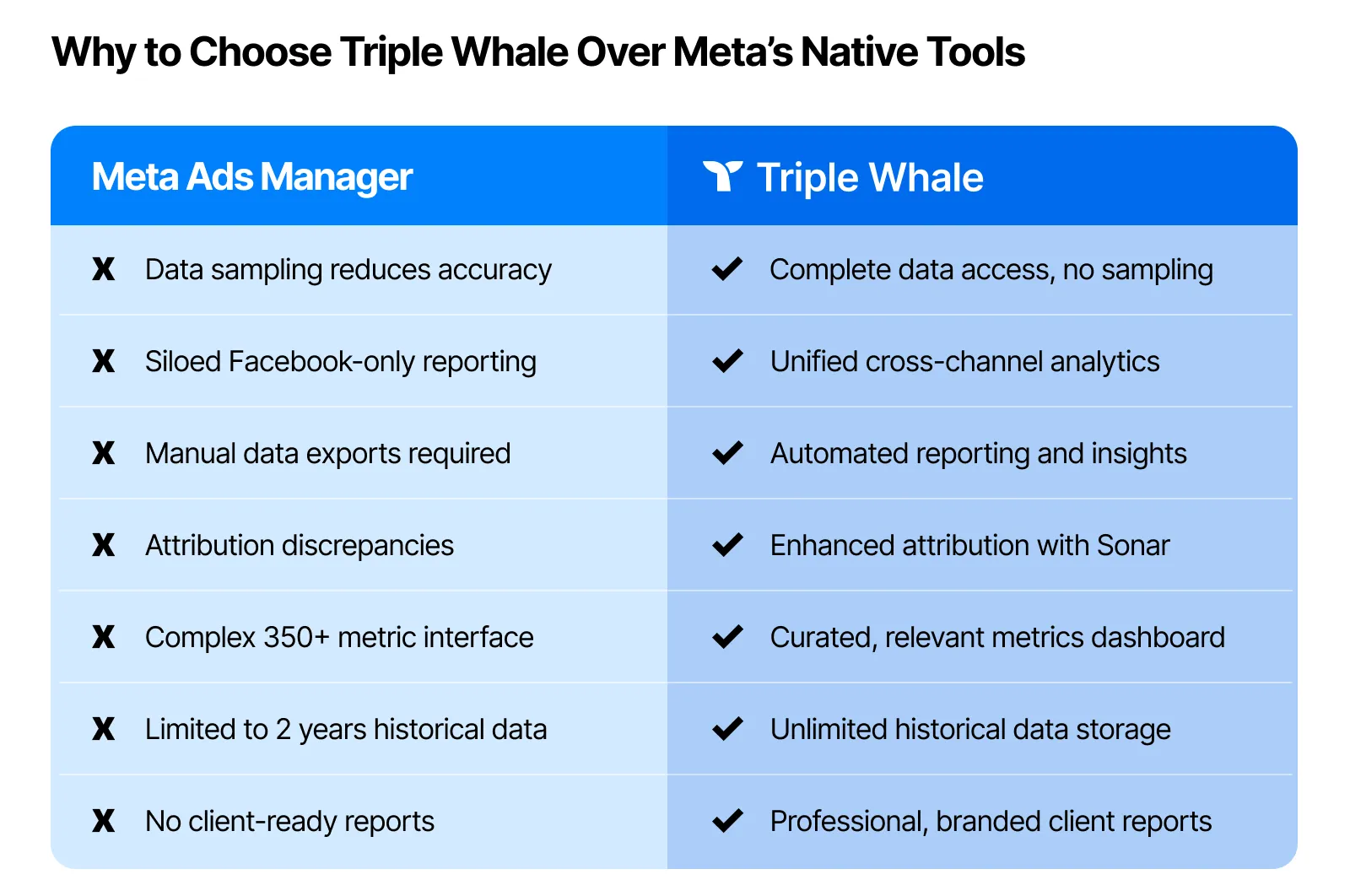
Limitations of Native Meta Reporting:
Data sampling on high-volume campaigns reduces accuracy
Limited cross-platform attribution. No attribution with other marketing channels
Time-consuming manual reports for comprehensive analysis
No historical data beyond 2 years
Complex interface with over 350 metrics that can overwhelm users
No automated reporting. Requires manual compilation for client reports
Using Triple Whale: A Superior Alternative for Facebook Ad Analytics
While Meta Ads Manager provides comprehensive native analytics, Triple Whale offers an enhanced approach to Facebook ad tracking that addresses many of the platform’s limitations while providing additional insights and automation.
Enhanced setup and integration
Unlike Meta’s isolated reporting, Triple Whale connects directly to your Meta Ads Manager account, automatically importing all campaign data without requiring manual exports or complex configurations. The platform combines Facebook ad data with other marketing channels, providing a unified view of your entire marketing performance. You can connect up to 20 Meta ad accounts to a single Triple Whale account, making it ideal for agencies managing multiple clients.
Superior data accuracy
Sonar technology captures up to 70% more conversions that Meta’s pixel tracking misses
Improving Event Match Quality (EMQ) scores for better targeting accuracy
Enhanced attribution modeling through first-party data collection
Cross-platform data unification eliminates discrepancies between Facebook and Google Analytics
Real-time data synchronization with no delays or sampling
Advanced analytics capabilities
Triple Attribution + Views model that combines click-attributed conversions with Meta’s view-through conversions for complete performance visibility
Custom dashboard creation focused on metrics that matter to your business
Automated anomaly detection alerts you to performance changes instantly
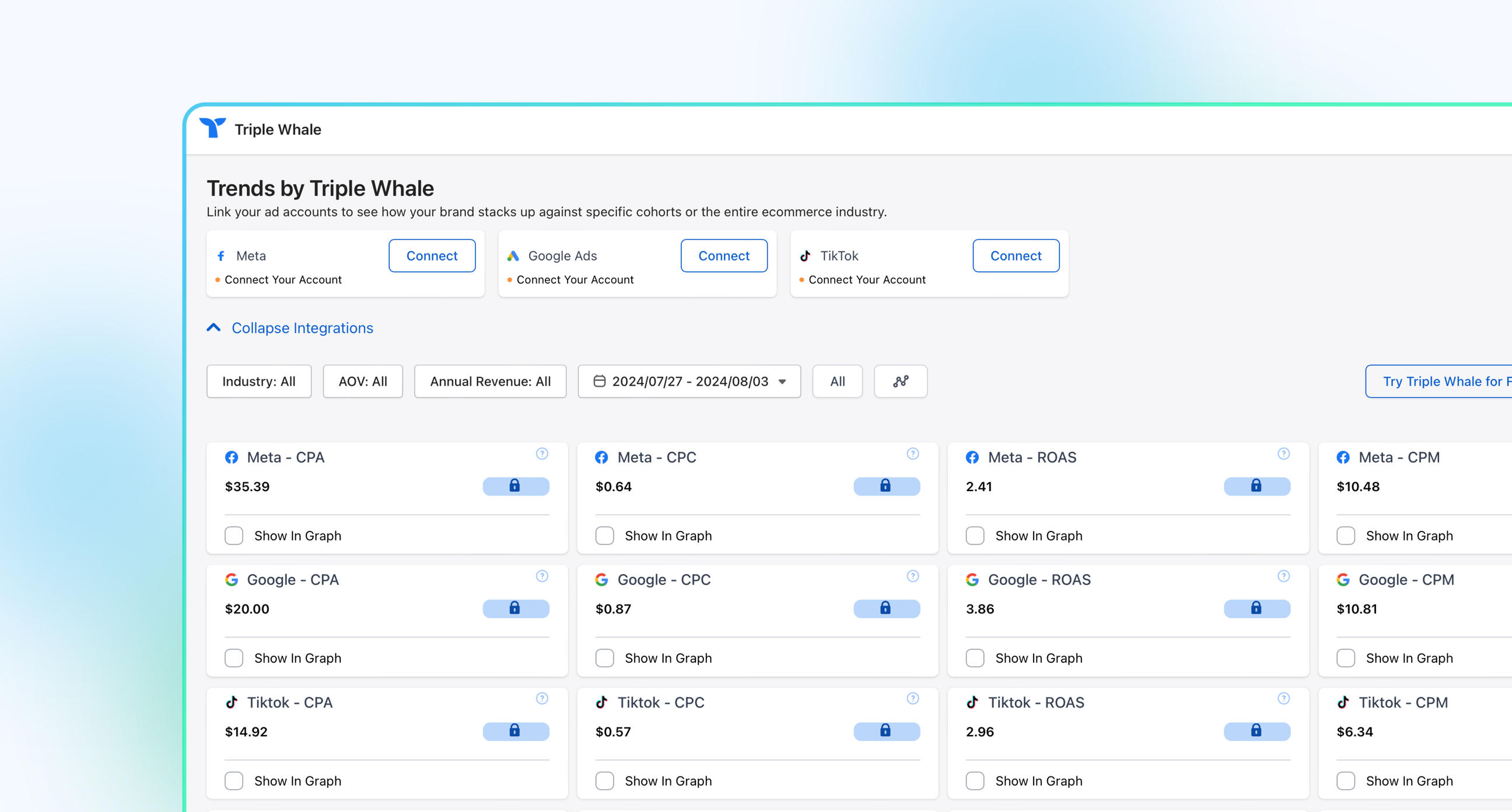
Industry benchmark comparisons show how your campaigns stack up
AI-powered insights provide optimization recommendations automatically
Advantages over native tracking
No data sampling. Access to complete campaign data regardless of volume.
Faster load times with optimized reporting infrastructure
Mobile-responsive dashboards for monitoring campaigns on-the-go
Team collaboration features including shared dashboards and commenting
This comprehensive approach to Facebook ad analytics enables more informed decision-making and can lead to significant improvements in campaign performance and ROI through enhanced data accuracy and advanced attribution modeling.
Best Practices for Facebook Ads Analytics
Setting Up Effective Measurement
1. Define Clear Objectives
Before launching campaigns, establish specific, measurable goals that align with your business objectives. Different campaign types require different primary metrics:
Traffic campaigns: Focus on CTR and CPC
Lead generation: Prioritize conversion rate and cost per lead
Sales campaigns: Emphasize ROAS and cost per acquisition
2. Implement Proper Attribution
To minimize discrepancies between Facebook and Google Analytics, exclude view-through conversions in Facebook attribution settings and focus on click-through conversions.
3. Use Breakdowns for Deeper Insights
Utilize Facebook's breakdown options to analyze performance by:
1. Creative Performance Analysis Facebook and Instagram are extremely visual platforms, and the quality of your ad creative is going to matter more and more. Regularly analyze which creative elements drive the best performance:
Test different video hooks and opening sequences
Analyze which image styles generate higher CTRs
Monitor creative fatigue through frequency and performance metrics
2. Audience Refinement. Many advertisers now report better results with broad targeting using Meta's AI optimization. Consider:
Using Custom Audiences for high-intent retargeting
Testing Lookalike Audiences at different similarity percentages
Leveraging Meta's Advantage+ audience features
3. Budget Optimization. Monitor performance trends to inform budget allocation:
Increase budgets for high-performing ad sets
Pause underperforming creative variations
Use Meta Ads Manager's option to schedule budget increases on high-traffic days
Common Mistakes to Avoid
Focusing on Vanity Metrics. Don't prioritize metrics like reach or impressions over business-impact metrics like ROAS and conversion rate.
Making Decisions Too Quickly. Allow campaigns adequate time for Meta's algorithm to optimize, especially in the first 1-2 weeks when ROAS might start lower as the system learns.
Ignoring Attribution Windows. Understand how different attribution windows affect your data interpretation and ensure consistency across reporting periods.
Neglecting Creative Refresh. Refresh creative or expand audiences when frequency climbs too high (5+) to avoid ad fatigue and declining performance.
Reporting and Analysis Frequency
Daily Monitoring:
Check for any significant performance drops or spikes
Monitor frequency levels to prevent ad fatigue
Review automated rules and alerts
Weekly Analysis:
Analyze performance trends across key metrics
Identify top-performing creative and audience combinations
Plan creative refresh and audience expansion strategies
Leveraging Third-Party Analytics Tools
While Meta Ads Manager provides comprehensive native analytics, third-party tools can enhance your analysis capabilities:
Benefits of Enhanced Analytics:
Cross-platform attribution and reporting
Advanced data visualization
Automated insights and recommendations
Integration with other marketing channels
Key Features to Look For:
Real-time dashboard capabilities
Custom reporting and data export options
Attribution modeling across multiple touchpoints
ROI and lifetime value calculations
Staying Current with Platform Changes
Meta Ads Manager continues to evolve, with new features, policy changes, and technological advancements in 2025. To maintain effective analytics practices:
Monitor Platform Updates. Stay informed about new features and metric definitions through Meta's official business resources and industry publications.
Adapt to Privacy Changes. With ongoing privacy updates and policy changes, businesses should evaluate their ad placements carefully and adapt measurement strategies accordingly.
Embrace AI and Automation. Meta Ads Manager now includes AI workflow tools to support agencies and marketing teams, making it easier to optimize campaigns at scale.
Conclusion
Mastering Facebook ad analytics is essential for maximizing the effectiveness of your advertising investment. To evaluate the effectiveness of Facebook ads, focus on the right metrics, implement proper tracking, and follow data-driven optimization strategies. This way, you can significantly improve your campaign performance and ROI.
The key to success lies in understanding that analytics is an ongoing process, not a one-time setup. Continuously monitor your campaigns, test new approaches, and adapt to platform changes to stay ahead of the competition.
Remember that the most important metric is the one that directly ties to your business objectives. Whether that's driving website traffic, generating leads, or increasing sales, let your goals guide your analytics focus and optimization efforts.
Ready to take your Facebook advertising to the next level? Consider implementing advanced attribution solutions and comprehensive analytics platforms that can provide deeper insights into your campaign performance across all marketing channels. The investment in proper measurement and analytics will pay dividends in improved campaign performance and business growth.
Component Sales
5.32K
Benchmark your ecommerce brand against industry leaders
Meta’s Facebook (and Instagram) remain one of the most powerful and favored ad platforms for ecommerce businesses, and the 3.35 billion monthly active users (as of Q4 2024) are a main reason why. But a compelling ad is only the first step, and running a successful campaign requires a deep understanding of Facebook ad analytics to measure performance, optimize campaigns, and maximize return on investment.
Facebook ads have evolved dramatically over the past few years, especially post iOS 14.5 privacy changes that introduced a limitation for tracking capabilities. The more complex marketing environment means that marketers must leverage new analytics tools and strategies in order to run the most effective campaigns and complete a Facebook ads audit.
In this guide, we’ll walk through everything you need to know about Facebook ad analytics, from understanding key metrics to implementing data-driven optimization strategies that deliver measurable results.
What is Facebook Ad Analytics?
Before diving into specific metrics, it’s important to clarify that ‘Facebook ad analytics” isn’t the name of a specific tool. Rather, it’s a comprehensive term that encompasses the various metrics, reports, and analytical approaches used to track and evaluate Facebook advertising campaign performance.
The primary tool for accessing Facebook analytics is Meta Ads Manager (formerly Facebook Ads Manager), which serves as the central hub for creating, managing, and analyzing your Facebook and Instagram ad campaigns. This platform provides access to hundreds of different metrics and reporting capabilities that help advertisers understand campaign performance.
Key components of Facebook ad analytics include:
Performance metrics like click-through rate (CTR), cost per click (CPC) and return on ad spend (ROAS)
Engagement metrics such as likes, comments, shares, and video watch time
Conversion tracking through the Meta Pixel and Conversions API
Audience insights and demographic breakdowns
Attribution reporting across different touchpoints
Understanding these analytics is crucial for making informed decisions about budget allocation, audience targeting, creative optimization, and overall campaign strategy.
The most important Facebook ads metrics to track
Meta Ads Manager offers access to more than 350 different metrics, which can be overwhelming for advertisers trying to focus on what matters most. Here are the essential metrics organized by category to help you prioritize your analysis:
Performance metrics
Click-through rate (CTR)
What it measures: The percentage of people who clicked your ad after seeing it.
How to calculate: CTR = (Clicks / Impressions) x 100
Why it matters: CTR indicates how engaging and relevant your ad is to your target audience. A higher CTR signals strong alignment between your ad content, design, and audience interests.
Cost Per Click (CPC)
What it measures: The average amount you pay each time someone clicks your ad.
How to calculate: CPC = Total Ad Spend / Total Clicks
Why it matters: CPC helps you understand the cost efficiency of driving traffic to your website or landing page.
Return on Ad Spend (ROAS)
What it measures: The revenue generated for each dollar spent on advertising.
How to calculate: ROAS = Revenue from Ads / Ad Spend
Why it matters: ROAS is often considered the most important metric as it directly ties advertising investment to business results.
Conversion metrics
Conversion Rate
What it measures: The percentage of clicks that result in a desired action (purchase, sign-up, etc.)
How to calculate: Conversion Rate = (Conversions / Clicks) x 100
Why it matters: This metric reveals how effective your landing pages and offers are at converting traffic into customers.
Cost Per Acquisition (CPA)
What it measures: The average cost to acquire a customer or complete a specific action.
How to calculate: CPA = Total Ad Spend / Number of Conversions
Why it matters: CPA helps determine if your advertising costs are sustainable relative to customer value.
Engagement metrics
Hook Rate (Thumb Stop Rate)
What it measures: The percentage of people who stop scrolling and watch your video ad for at least 3 seconds.
How to calculate: Hook Rate = (3-Second Video Plays / Impressions) x 100
Why it matters: Hook rate is crucial for video ads as it indicates how well your creative captures attention in users’ feeds. A good hook rate typically ranges from 30-45%
Hold Rate
What it measures: The percentage of people who continue watching after the initial 3 seconds, typically measured to 15 seconds.
How to calculate: Hold Rate = (15-Second Video Plays / 3-Second Video Plays) x 100
Why it matters: Hold rate indicates whether your content maintains viewer interest beyond the initial hook. High-performing ads typically have both high hook rates and high hold rates.
Reach and frequency metrics
Impressions
What it measures: The total number of times your ad was displayed.
Why it matters: Impressions can help you understand the potential reach of your campaign and can indicate if you’re reaching enough people to achieve your goals.
Frequency
What it measures: The average number of times each person saw your ad
Why it matters: Keep frequency under 3-4 to avoid ad fatigue. High frequency (5+) leads to decreased performance, higher costs, and negative feedback.
Cost Per Mille (CPM)
What it measures: The cost per 1,000 impressions
Why it matters: CPM helps evaluate the cost efficiency of reaching your target audience and can indicate auction completion levels.
How to Track Facebook Ad Analytics
Using Meta Ads Manager (Native Approach)
Meta Ads Manager is your primary tool for tracking Facebook ad analytics. Here’s how to access and customize your reporting:
Accessing Meta Ads Manager:
Log into your Facebook Business account
Navigate to Meta Ads Manager from the main menu
Select the campaign, ad set, or ad level you want to analyze
Customizing Your View:
Click on the "Columns" dropdown in the reporting interface
Select "Performance and Clicks" for basic metrics
Choose "Customize Columns" to add specific metrics like hook rate or hold rate
Save custom column sets for consistent reporting
Setting Up Key Metrics:
For Hook Rate:
Go to Customize Columns
Search for "3-second video plays"
Add both "3-second video plays" and "Impressions" to calculate the ratio
For Hold Rate:
Add "ThruPlays" (15-second video plays)
Include "3-second video plays"
Calculate the ratio: ThruPlays ÷ 3-second video plays
Advanced Tracking Options
Meta Pixel and Conversions API
Meta's integration with Google Analytics provides expanded insight into how campaigns drive traffic and user activity. This integration, combined with the Meta Pixel and Conversions API, offers more comprehensive attribution data.
Custom UTM Parameters
Meta is improving its ads creation interface by providing one-click options for suggested UTM parameters, helping identify traffic sources in Google Analytics. Proper UTM tagging ensures accurate attribution across platforms.
Limitations of Native Meta Reporting:
Data sampling on high-volume campaigns reduces accuracy
Limited cross-platform attribution. No attribution with other marketing channels
Time-consuming manual reports for comprehensive analysis
No historical data beyond 2 years
Complex interface with over 350 metrics that can overwhelm users
No automated reporting. Requires manual compilation for client reports
Using Triple Whale: A Superior Alternative for Facebook Ad Analytics
While Meta Ads Manager provides comprehensive native analytics, Triple Whale offers an enhanced approach to Facebook ad tracking that addresses many of the platform’s limitations while providing additional insights and automation.
Enhanced setup and integration
Unlike Meta’s isolated reporting, Triple Whale connects directly to your Meta Ads Manager account, automatically importing all campaign data without requiring manual exports or complex configurations. The platform combines Facebook ad data with other marketing channels, providing a unified view of your entire marketing performance. You can connect up to 20 Meta ad accounts to a single Triple Whale account, making it ideal for agencies managing multiple clients.
Superior data accuracy
Sonar technology captures up to 70% more conversions that Meta’s pixel tracking misses
Improving Event Match Quality (EMQ) scores for better targeting accuracy
Enhanced attribution modeling through first-party data collection
Cross-platform data unification eliminates discrepancies between Facebook and Google Analytics
Real-time data synchronization with no delays or sampling
Advanced analytics capabilities
Triple Attribution + Views model that combines click-attributed conversions with Meta’s view-through conversions for complete performance visibility
Custom dashboard creation focused on metrics that matter to your business
Automated anomaly detection alerts you to performance changes instantly
Industry benchmark comparisons show how your campaigns stack up
AI-powered insights provide optimization recommendations automatically
Advantages over native tracking
No data sampling. Access to complete campaign data regardless of volume.
Faster load times with optimized reporting infrastructure
Mobile-responsive dashboards for monitoring campaigns on-the-go
Team collaboration features including shared dashboards and commenting
This comprehensive approach to Facebook ad analytics enables more informed decision-making and can lead to significant improvements in campaign performance and ROI through enhanced data accuracy and advanced attribution modeling.
Best Practices for Facebook Ads Analytics
Setting Up Effective Measurement
1. Define Clear Objectives
Before launching campaigns, establish specific, measurable goals that align with your business objectives. Different campaign types require different primary metrics:
Traffic campaigns: Focus on CTR and CPC
Lead generation: Prioritize conversion rate and cost per lead
Sales campaigns: Emphasize ROAS and cost per acquisition
2. Implement Proper Attribution
To minimize discrepancies between Facebook and Google Analytics, exclude view-through conversions in Facebook attribution settings and focus on click-through conversions.
3. Use Breakdowns for Deeper Insights
Utilize Facebook's breakdown options to analyze performance by:
1. Creative Performance Analysis Facebook and Instagram are extremely visual platforms, and the quality of your ad creative is going to matter more and more. Regularly analyze which creative elements drive the best performance:
Test different video hooks and opening sequences
Analyze which image styles generate higher CTRs
Monitor creative fatigue through frequency and performance metrics
2. Audience Refinement. Many advertisers now report better results with broad targeting using Meta's AI optimization. Consider:
Using Custom Audiences for high-intent retargeting
Testing Lookalike Audiences at different similarity percentages
Leveraging Meta's Advantage+ audience features
3. Budget Optimization. Monitor performance trends to inform budget allocation:
Increase budgets for high-performing ad sets
Pause underperforming creative variations
Use Meta Ads Manager's option to schedule budget increases on high-traffic days
Common Mistakes to Avoid
Focusing on Vanity Metrics. Don't prioritize metrics like reach or impressions over business-impact metrics like ROAS and conversion rate.
Making Decisions Too Quickly. Allow campaigns adequate time for Meta's algorithm to optimize, especially in the first 1-2 weeks when ROAS might start lower as the system learns.
Ignoring Attribution Windows. Understand how different attribution windows affect your data interpretation and ensure consistency across reporting periods.
Neglecting Creative Refresh. Refresh creative or expand audiences when frequency climbs too high (5+) to avoid ad fatigue and declining performance.
Reporting and Analysis Frequency
Daily Monitoring:
Check for any significant performance drops or spikes
Monitor frequency levels to prevent ad fatigue
Review automated rules and alerts
Weekly Analysis:
Analyze performance trends across key metrics
Identify top-performing creative and audience combinations
Plan creative refresh and audience expansion strategies
Leveraging Third-Party Analytics Tools
While Meta Ads Manager provides comprehensive native analytics, third-party tools can enhance your analysis capabilities:
Benefits of Enhanced Analytics:
Cross-platform attribution and reporting
Advanced data visualization
Automated insights and recommendations
Integration with other marketing channels
Key Features to Look For:
Real-time dashboard capabilities
Custom reporting and data export options
Attribution modeling across multiple touchpoints
ROI and lifetime value calculations
Staying Current with Platform Changes
Meta Ads Manager continues to evolve, with new features, policy changes, and technological advancements in 2025. To maintain effective analytics practices:
Monitor Platform Updates. Stay informed about new features and metric definitions through Meta's official business resources and industry publications.
Adapt to Privacy Changes. With ongoing privacy updates and policy changes, businesses should evaluate their ad placements carefully and adapt measurement strategies accordingly.
Embrace AI and Automation. Meta Ads Manager now includes AI workflow tools to support agencies and marketing teams, making it easier to optimize campaigns at scale.
Conclusion
Mastering Facebook ad analytics is essential for maximizing the effectiveness of your advertising investment. To evaluate the effectiveness of Facebook ads, focus on the right metrics, implement proper tracking, and follow data-driven optimization strategies. This way, you can significantly improve your campaign performance and ROI.
The key to success lies in understanding that analytics is an ongoing process, not a one-time setup. Continuously monitor your campaigns, test new approaches, and adapt to platform changes to stay ahead of the competition.
Remember that the most important metric is the one that directly ties to your business objectives. Whether that's driving website traffic, generating leads, or increasing sales, let your goals guide your analytics focus and optimization efforts.
Ready to take your Facebook advertising to the next level? Consider implementing advanced attribution solutions and comprehensive analytics platforms that can provide deeper insights into your campaign performance across all marketing channels. The investment in proper measurement and analytics will pay dividends in improved campaign performance and business growth.
Share
Allie Mistakidis
Allie Mistakidis
Allie Mistakidis is a Content Writer at Triple Whale, silversmith at Aloraflora Jewelry, and retail store co-owner at Whiskeyjack Boutique in Windsor, ON, Canada. She has a Masters degree in plumage evolution in birds, and spent several years doing technical support, including at Shopify. You can connect with her on LinkedIn.
Body Copy: The following benchmarks compare advertising metrics from April 1-17 to the previous period. Considering President Trump first unveiled his tariffs on April 2, the timing corresponds with potential changes in advertising behavior among ecommerce brands (though it isn’t necessarily correlated).


 Moby AIAsk questions, analyze performance, and work with your business context.
 ActionsTake governed action across the tools that run your business.
 AutomationsSchedule recurring analysis and work that runs on your terms.
 Landing PagesCreative conversion-focused ecommerce pages with Moby.
 Creative StudioGenerate and refine creative grounded in your brand.






.jpg)





.webp)

.webp)
