If you’ve ever looked at a Meta ROAS report and thought, “but did our ads actually cause this?” you’re already asking the right question. At a certain point, attribution alone isn’t enough — you need to understand true lift, not just reported performance.
This guide is a practical walkthrough of the Meta-specific incrementality testing tool — Meta Conversion Lift — including how to get set up, run a clean test, and turn the results into confident decisions.
What Is a Meta Conversion Lift Test?
A Meta Conversion Lift test is a randomized experiment that measures the incremental impact of your Meta ads by comparing outcomes between two statistically similar groups:
Test group: users eligible to see your ads
Control group (holdout): users who are not shown those ads
By measuring the difference in conversions between the two groups, Meta estimates lift — what would have happened without advertising.
Incrementality experiments, like Meta Conversion Lift tests, close this gap by observing what changes when ads are shown versus withheld, helping you:
Optimize your marketing spend and get greater ROI.
Make more confident decisions about what to scale or cut back on.
Reduce attribution bias with randomized audience assignments.
Gain better insights on campaigns, ad sets, and creative.
How the Conversion Lift Test Works
At a high level, a Meta conversion lift test follows a classic randomized controlled experiment design. Below is an overview of what that entails.
Audience Randomization & Segmentation
Meta randomly assigns eligible users within your selected audience to one of two groups: the test group (all users see your ad) and the control group (users are withheld from seeing your ad).
This randomization ensures the groups are statistically comparable across factors like demographics, geography, prior behavior, and device usage.
Test & Conversion Tracking:
The test runs for a fixed period of time. During that window, Meta measures conversions using your selected conversion source, including:
Meta Pixel
Conversions API (CAPI)
App events
Offline conversions
Lift Calculation
After the test concludes, the report “lift” is shown as the percentage difference in conversion rates between the test and control groups.
This lift represents the incremental impact of your ads — the conversions that would not have occurred without advertising.
Meta Conversion Lift Test vs. Meta Incrementality Testing
Meta incrementality testing is an umbrella term for a set of experiments designed to find causal impact across different objectives. In practice, that shows up as a few common lift tests, including:
Conversion Lift: Measures incremental impact on purchases, leads, or engagement.
Brand Lift: Measures lift in brand outcomes like ad recall, awareness, consideration, favorability, or purchase intent.
Sales Lift (Offline): Measures incremental impact on in-store or offline conversions using matched transaction data.
Meta Lift Test Versus GeoLift Test
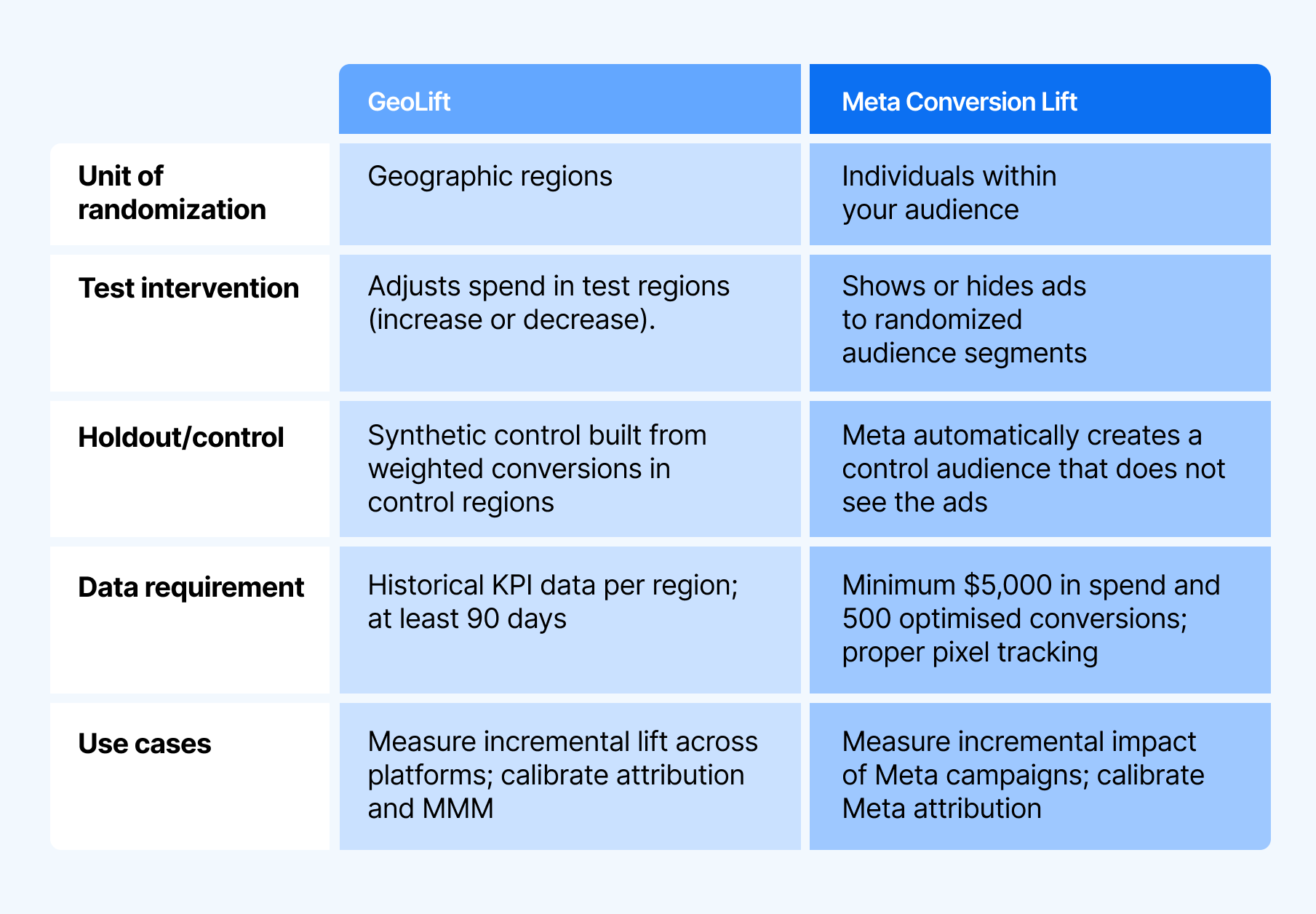
While both are incrementality testing methods, Meta Lift Tests evaluate the causal impact of Meta ads at the user level, whereas GeoLift Tests assess overall business impact by comparing performance across geographic regions.
Who Can Run a Meta Conversion Lift Test?
So, if by now you’re interested in running a conversion lift test for your own campaigns, you may be wondering if it’s right for you.
In general, you need:
An active Meta ad account in good standing
Sufficient expected conversion volume during the test window
All experiments live in the Experiments dashboard, where you can track status, date range, and results in your attribution dashboard.
The following is an overview of how to run a conversion lift test inside Triple Whale.
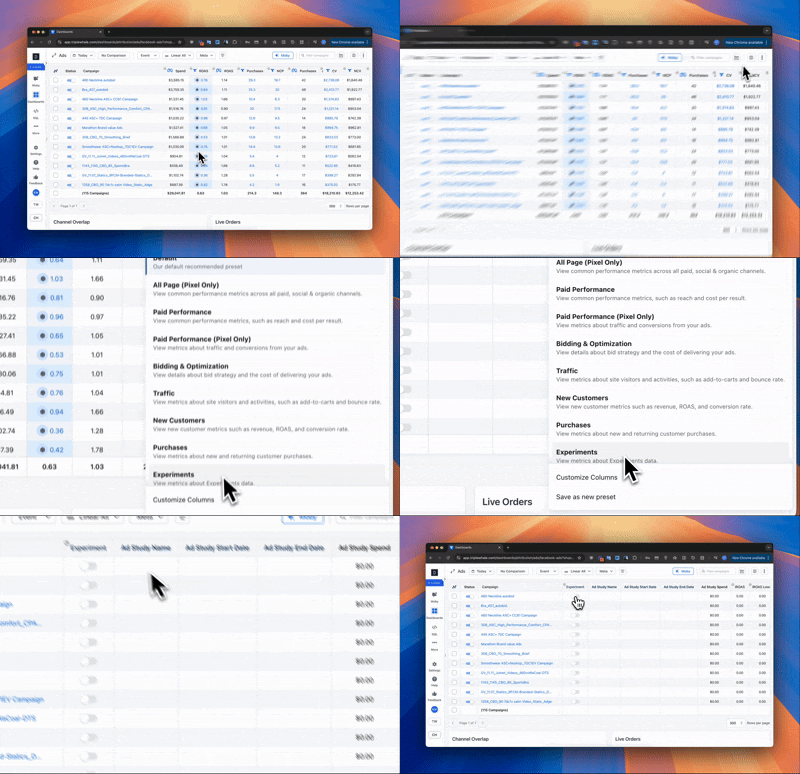
1. Select the Experiment Column
Open Select Columns, then either:
Choose the Experiments preset, or
Add Experiment fields via Customize Columns
This allows you to monitor lift tests directly within your campaign reporting.
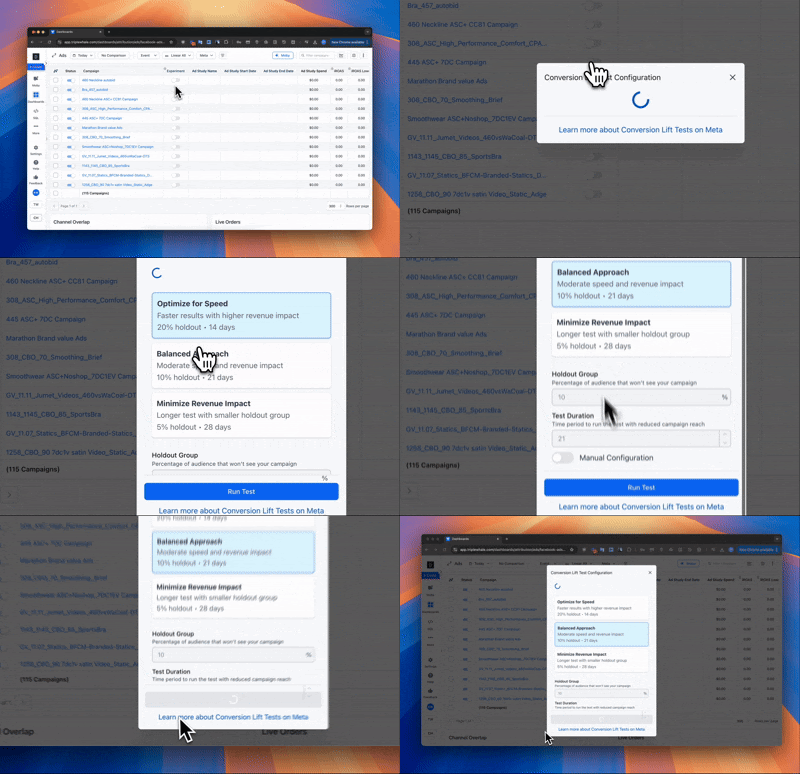
2. Configure Your Conversion Lift Test
Select the campaign you want to test and configure the study:
Name the ad study clearly so it’s easy to reference later
Select the Pixel tied to your primary conversion event
Choose your holdout group and test duration
Holdout group: Percentage of the audience that won’t see ads
Test duration: Length of time ads are withheld from the control group
You’ll also choose how aggressively the test runs:
Optimize for Speed: Faster results, higher short-term revenue risk
Balanced Approach (recommended for first tests)
Minimize Revenue Impact: Slower results with less disruption
Manual Configuration: Full control over holdout size and duration
3. Launch & Monitor
Review your settings, then click Run Test. Once live, monitor progress directly from the Experiments columns. While you can stop a test early, it’s best to let it run to completion to ensure statistical confidence.
4. End the Experiment & Act
When the test finishes:
Restore campaigns to normal targeting or spend
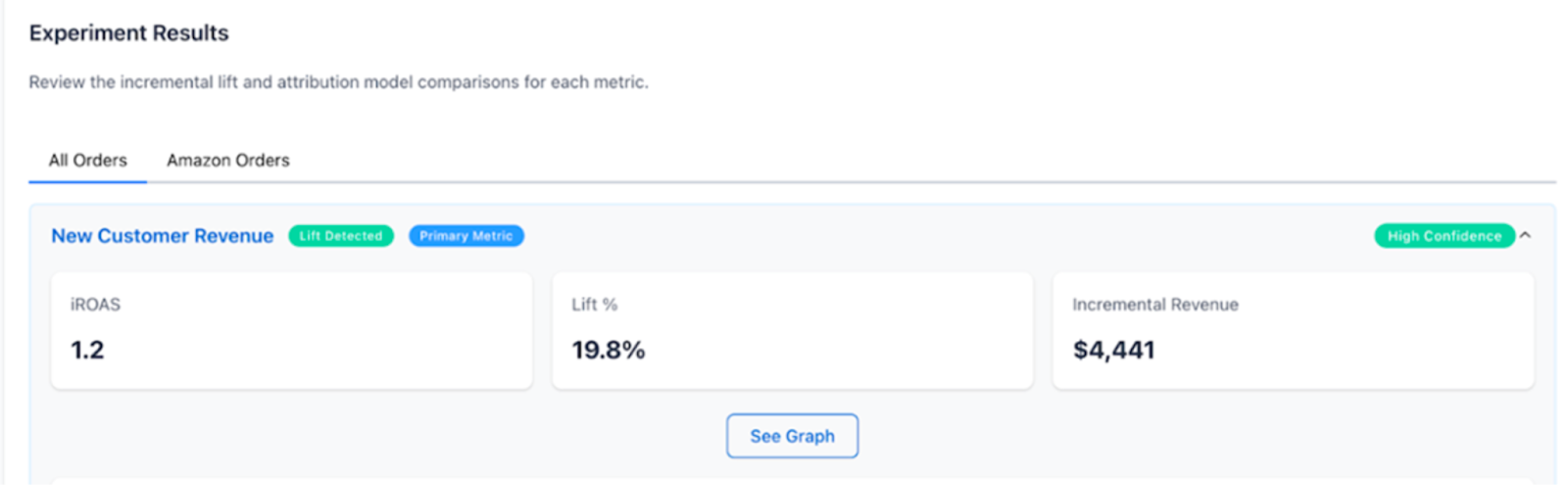
Review lift %, incremental conversions, and iROAS
Use the results to inform budget allocation, creative decisions, or channel strategy
If lift is minimal or nonexistent, that’s still a valuable insight — it often indicates spend is better deployed elsewhere.
What Should I Do Next?
A conversion lift test doesn’t give you a simple “on/off” answer — it gives you decision-making inputs. The key is knowing how to interpret them correctly.
Key Metrics to Understand
Lift %: The relative increase in conversions caused by ads compared to the control group. High lift means ads are truly incremental.
Incremental Conversions: The actual number of conversions that would not have happened without ads. This is your true causal impact.
Confidence Interval: Indicates statistical reliability. Narrow intervals mean more certainty; wide intervals suggest you may need more data.
iROAS & CPIC: Incrementality-adjusted efficiency metrics that show the real return and cost per incremental conversion.
Best Practices of Meta Conversion Lift Testing
To get reliable, actionable results from a Meta conversion lift test, follow these best practices:
Choose the right campaigns: Focus on campaigns with enough conversion volume to generate meaningful results. Very small or newly launched campaigns often don’t produce reliable lift estimates.
Follow recommended settings: A 10–20% holdout is ideal — larger holdouts create a stronger signal. In Triple Whale, recommended test duration, spend reduction, and holdout size are based on power analysis to balance statistical confidence with business impact.
Keep conditions consistent: Avoid major creative changes, promotions, or budget shifts during the test. Stability helps ensure the results reflect the impact of ads, not outside factors.
Let it run: Run the experiment for the full recommended duration. Ending early can weaken statistical confidence and lead to misleading conclusions.
Using Compass to Make Lift Tests Actionable
While Meta provides the infrastructure to run these tests, interpreting results — and connecting them to broader measurement strategies — is where most teams struggle.
By unifying lift studies with attribution and MMM, Compass by Triple Whale helps brands move beyond surface-level performance metrics and make confident, data-backed decisions rooted in causality.
If you want to operationalize conversion lift studies, align them with your broader measurement strategy, and turn incrementality into a competitive advantage, Compass can help. Book a demo today to see it in action.
Component Sales
5.32K
Benchmark your ecommerce brand against industry leaders
If you’ve ever looked at a Meta ROAS report and thought, “but did our ads actually cause this?” you’re already asking the right question. At a certain point, attribution alone isn’t enough — you need to understand true lift, not just reported performance.
This guide is a practical walkthrough of the Meta-specific incrementality testing tool — Meta Conversion Lift — including how to get set up, run a clean test, and turn the results into confident decisions.
What Is a Meta Conversion Lift Test?
A Meta Conversion Lift test is a randomized experiment that measures the incremental impact of your Meta ads by comparing outcomes between two statistically similar groups:
Test group: users eligible to see your ads
Control group (holdout): users who are not shown those ads
By measuring the difference in conversions between the two groups, Meta estimates lift — what would have happened without advertising.
Incrementality experiments, like Meta Conversion Lift tests, close this gap by observing what changes when ads are shown versus withheld, helping you:
Optimize your marketing spend and get greater ROI.
Make more confident decisions about what to scale or cut back on.
Reduce attribution bias with randomized audience assignments.
Gain better insights on campaigns, ad sets, and creative.
How the Conversion Lift Test Works
At a high level, a Meta conversion lift test follows a classic randomized controlled experiment design. Below is an overview of what that entails.
Audience Randomization & Segmentation
Meta randomly assigns eligible users within your selected audience to one of two groups: the test group (all users see your ad) and the control group (users are withheld from seeing your ad).
This randomization ensures the groups are statistically comparable across factors like demographics, geography, prior behavior, and device usage.
Test & Conversion Tracking:
The test runs for a fixed period of time. During that window, Meta measures conversions using your selected conversion source, including:
Meta Pixel
Conversions API (CAPI)
App events
Offline conversions
Lift Calculation
After the test concludes, the report “lift” is shown as the percentage difference in conversion rates between the test and control groups.
This lift represents the incremental impact of your ads — the conversions that would not have occurred without advertising.
Meta Conversion Lift Test vs. Meta Incrementality Testing
Meta incrementality testing is an umbrella term for a set of experiments designed to find causal impact across different objectives. In practice, that shows up as a few common lift tests, including:
Conversion Lift: Measures incremental impact on purchases, leads, or engagement.
Brand Lift: Measures lift in brand outcomes like ad recall, awareness, consideration, favorability, or purchase intent.
Sales Lift (Offline): Measures incremental impact on in-store or offline conversions using matched transaction data.
Meta Lift Test Versus GeoLift Test
While both are incrementality testing methods, Meta Lift Tests evaluate the causal impact of Meta ads at the user level, whereas GeoLift Tests assess overall business impact by comparing performance across geographic regions.
Who Can Run a Meta Conversion Lift Test?
So, if by now you’re interested in running a conversion lift test for your own campaigns, you may be wondering if it’s right for you.
In general, you need:
An active Meta ad account in good standing
Sufficient expected conversion volume during the test window
All experiments live in the Experiments dashboard, where you can track status, date range, and results in your attribution dashboard.
The following is an overview of how to run a conversion lift test inside Triple Whale.
1. Select the Experiment Column
Open Select Columns, then either:
Choose the Experiments preset, or
Add Experiment fields via Customize Columns
This allows you to monitor lift tests directly within your campaign reporting.
2. Configure Your Conversion Lift Test
Select the campaign you want to test and configure the study:
Name the ad study clearly so it’s easy to reference later
Select the Pixel tied to your primary conversion event
Choose your holdout group and test duration
Holdout group: Percentage of the audience that won’t see ads
Test duration: Length of time ads are withheld from the control group
You’ll also choose how aggressively the test runs:
Optimize for Speed: Faster results, higher short-term revenue risk
Balanced Approach (recommended for first tests)
Minimize Revenue Impact: Slower results with less disruption
Manual Configuration: Full control over holdout size and duration
3. Launch & Monitor
Review your settings, then click Run Test. Once live, monitor progress directly from the Experiments columns. While you can stop a test early, it’s best to let it run to completion to ensure statistical confidence.
4. End the Experiment & Act
When the test finishes:
Restore campaigns to normal targeting or spend
Review lift %, incremental conversions, and iROAS
Use the results to inform budget allocation, creative decisions, or channel strategy
If lift is minimal or nonexistent, that’s still a valuable insight — it often indicates spend is better deployed elsewhere.
What Should I Do Next?
A conversion lift test doesn’t give you a simple “on/off” answer — it gives you decision-making inputs. The key is knowing how to interpret them correctly.
Key Metrics to Understand
Lift %: The relative increase in conversions caused by ads compared to the control group. High lift means ads are truly incremental.
Incremental Conversions: The actual number of conversions that would not have happened without ads. This is your true causal impact.
Confidence Interval: Indicates statistical reliability. Narrow intervals mean more certainty; wide intervals suggest you may need more data.
iROAS & CPIC: Incrementality-adjusted efficiency metrics that show the real return and cost per incremental conversion.
Best Practices of Meta Conversion Lift Testing
To get reliable, actionable results from a Meta conversion lift test, follow these best practices:
Choose the right campaigns: Focus on campaigns with enough conversion volume to generate meaningful results. Very small or newly launched campaigns often don’t produce reliable lift estimates.
Follow recommended settings: A 10–20% holdout is ideal — larger holdouts create a stronger signal. In Triple Whale, recommended test duration, spend reduction, and holdout size are based on power analysis to balance statistical confidence with business impact.
Keep conditions consistent: Avoid major creative changes, promotions, or budget shifts during the test. Stability helps ensure the results reflect the impact of ads, not outside factors.
Let it run: Run the experiment for the full recommended duration. Ending early can weaken statistical confidence and lead to misleading conclusions.
Using Compass to Make Lift Tests Actionable
While Meta provides the infrastructure to run these tests, interpreting results — and connecting them to broader measurement strategies — is where most teams struggle.
By unifying lift studies with attribution and MMM, Compass by Triple Whale helps brands move beyond surface-level performance metrics and make confident, data-backed decisions rooted in causality.
If you want to operationalize conversion lift studies, align them with your broader measurement strategy, and turn incrementality into a competitive advantage, Compass can help. Book a demo today to see it in action.
Share
Kaleena Stroud
Kaleena Stroud is a copywriter for SaaS and DTC businesses.
Kaleena Stroud
Kaleena Stroud is a content writer at Triple Whale, bringing data stories to life. She spent many years running an online copywriting business, where she helped brands launch and revamp their Shopify stores. Her work has been featured in Practical Ecommerce, Convert, and Create & Cultivate.
Body Copy: The following benchmarks compare advertising metrics from April 1-17 to the previous period. Considering President Trump first unveiled his tariffs on April 2, the timing corresponds with potential changes in advertising behavior among ecommerce brands (though it isn’t necessarily correlated).


 Moby AIAsk questions, analyze performance, and work with your business context.
 ActionsTake governed action across the tools that run your business.
 AutomationsSchedule recurring analysis and work that runs on your terms.
 Landing PagesCreative conversion-focused ecommerce pages with Moby.
 Creative StudioGenerate and refine creative grounded in your brand.












.webp)

.webp)
