Without reliable tracking, even the most well-planned marketing campaigns can leave you guessing which initiatives are paying off. By using UTMs, you gain clear data that shows exactly where your traffic is coming from.
So let’s break down the exact meaning of UTMs in your marketing, plus everything you need to know when it comes to tracking, analyzing, and best practices.
What Is a UTM Code and How Does it Work?
UTM (Urchin Tracking Module) parameters, also called UTM tags or UTM codes, are small pieces of code suffixed to your URL to track the metrics and performance of a specific digital marketing campaign.
The name comes from the software company acquired by Google named; you guessed it, Urchin. Later, UTMs were deeply integrated into GA.
Outside of having an analytics platform like Google Analytics on your site or app, you don’t need to install anything else. Most tracking platforms work right out of the box with UTMs. However, for the UTM to function properly, logging both referral and cookie information is required.
Why are UTMs helpful? Because they allow you to easily “track” users’ behaviors using just a link. In general, UTMs help you answer three questions:
Where’s the traffic coming from?
How is it coming to me?
Why is it coming to me?
UTM Parameters Explained
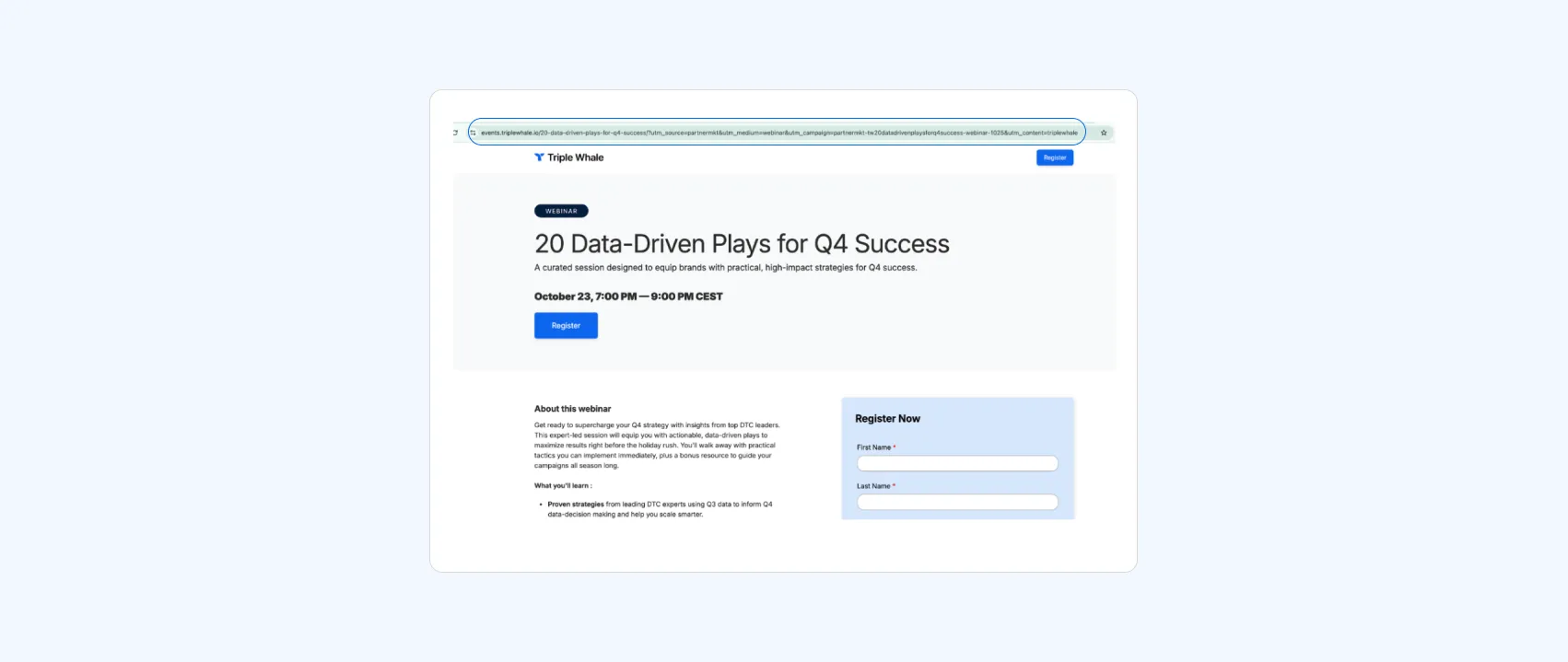
There are many variables to the UTM link. Take a look at the screenshot below.
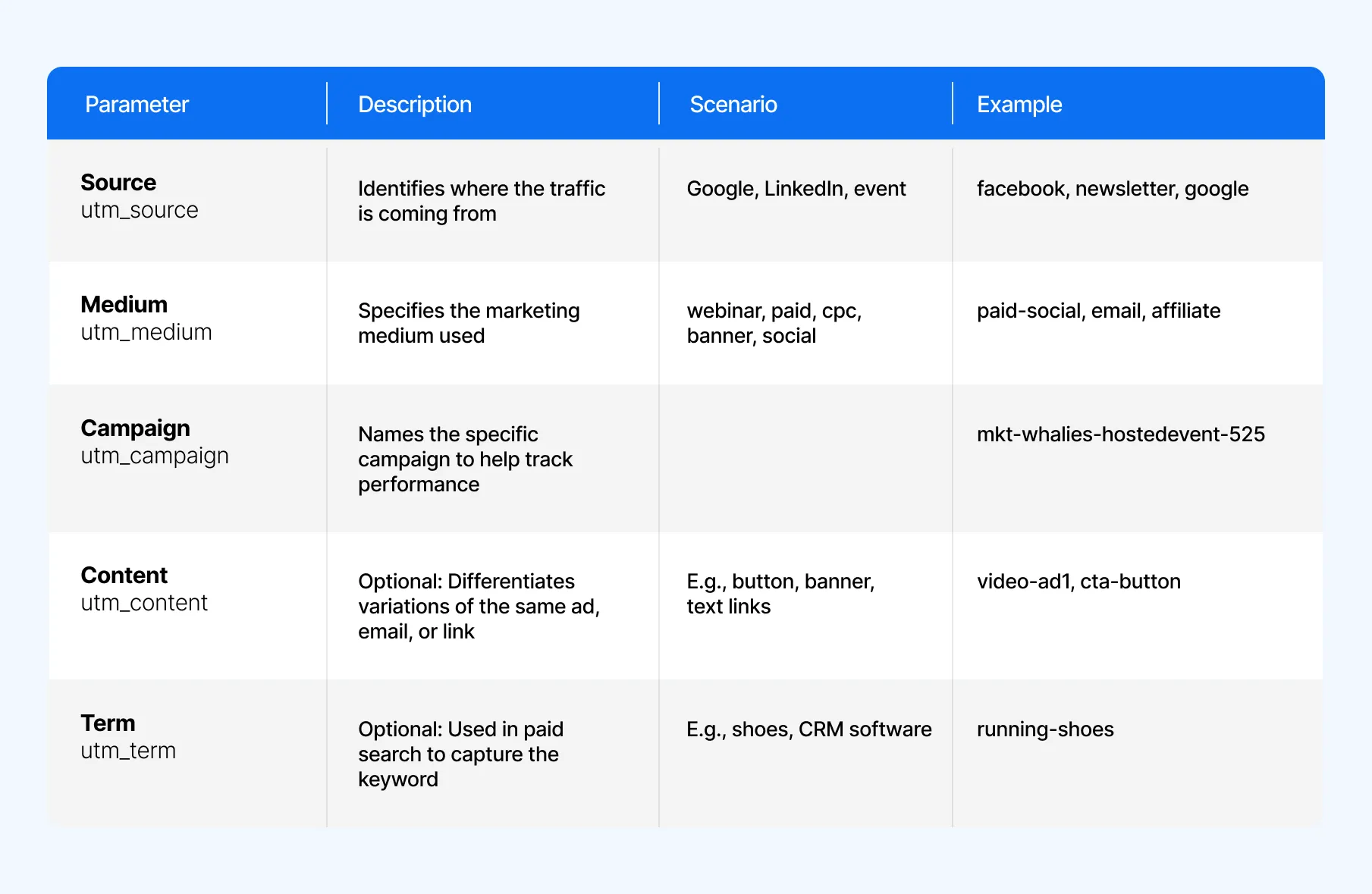
Here’s a list of UTM parameters below, plus a full breakdown to follow.
Source (utm_source)
The source parameter identifies where your traffic originates, helping you understand which platforms or partners are sending visitors to your site.
For example, you might use “google,” “linkedin,” or “event” to distinguish between different traffic sources.
Medium (utm_medium)
The medium parameter specifies the marketing channel or method used to reach your audience.
This could include “webinar,” “paid,” “cpc,” “banner,” or “social,” allowing you to compare performance across different types of marketing efforts.
Campaign (utm_campaign)
The campaign parameter labels a specific marketing campaign so you can measure its success across various platforms and content types.
For example, you might name it “mkt-whalies-hostedevent-525” to track engagement for a particular event or promotion.
Content (utm_content)
The content parameter is optional and helps differentiate between multiple versions of the same ad, email, or link.
It’s especially useful for A/B testing — for instance, using “button,” “banner,” or “textlinkA” to track which version performs best.
Term (utm_term)
The term parameter is also optional and primarily used in paid search campaigns to capture the specific keyword or phrase that triggered your ad, such as “shoes” or “crm software.”
Why UTM Tracking Matters for Attribution
There are many reasons why UTM tracking matters when it comes to marketing attribution.
Better Multi-Touch Attribution: UTM tracking ensures every marketing channel and campaign gets proper credit where credit’s due, showing exactly which touchpoints drive conversions.
Smarter Strategy: With clear visibility into what’s working, you can refine messaging, optimize targeting, and double down on high-performing tactics.
Efficient Spend: By identifying underperforming channels and wasted ad spend, UTM data helps reallocate budgets toward the campaigns that deliver the best ROI.
How to Create UTM Codes
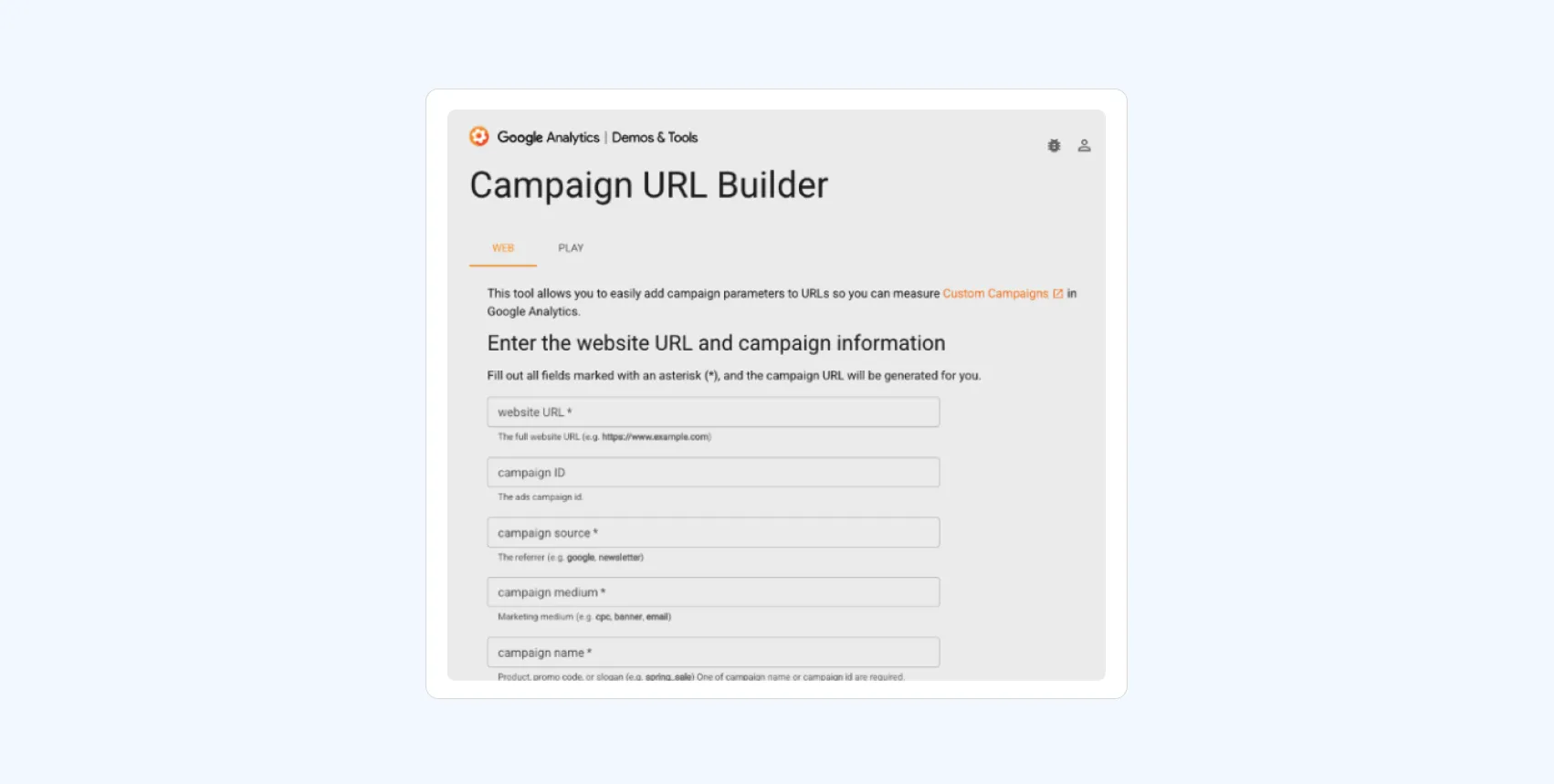
There are many ways to create UTM codes. Use whatever is easiest for you and integrates into your workflows.
Facebook
Facebook has its own URL parameter builder right in Ads Manager. So let’s use that to create a UTM tagged link for your FB ad.
Set everything up at the campaign and ad set level; the URL Params live at the ad level. Then you can either enter the URL you want to promote or:
Click Build a URL parameter under Website URL and fill in the blanks.
Add the URL, Campaign, Source, and Medium information into their respective boxes.
Manually Creating UTM Codes
You can create your own system using a spreadsheet or a project management system such as Notion. Be sure to follow our best practices below if you take this route.
Using Triple Whale
We recommend you use Triple Whale's custom Tracking Parameters in your marketing content. In doing so, each visitor will be informing our Pixel exactly which ad they just clicked on before arriving at your store.
This allows for precise tracking of customer journeys, allowing you to optimize your marketing strategies based on real-time data, improve ad targeting, and maximize your return on investment.
UTM Tracking Use Cases for Ecommerce and Digital Marketing
So what is a UTM link in action? Let’s take a closer look.
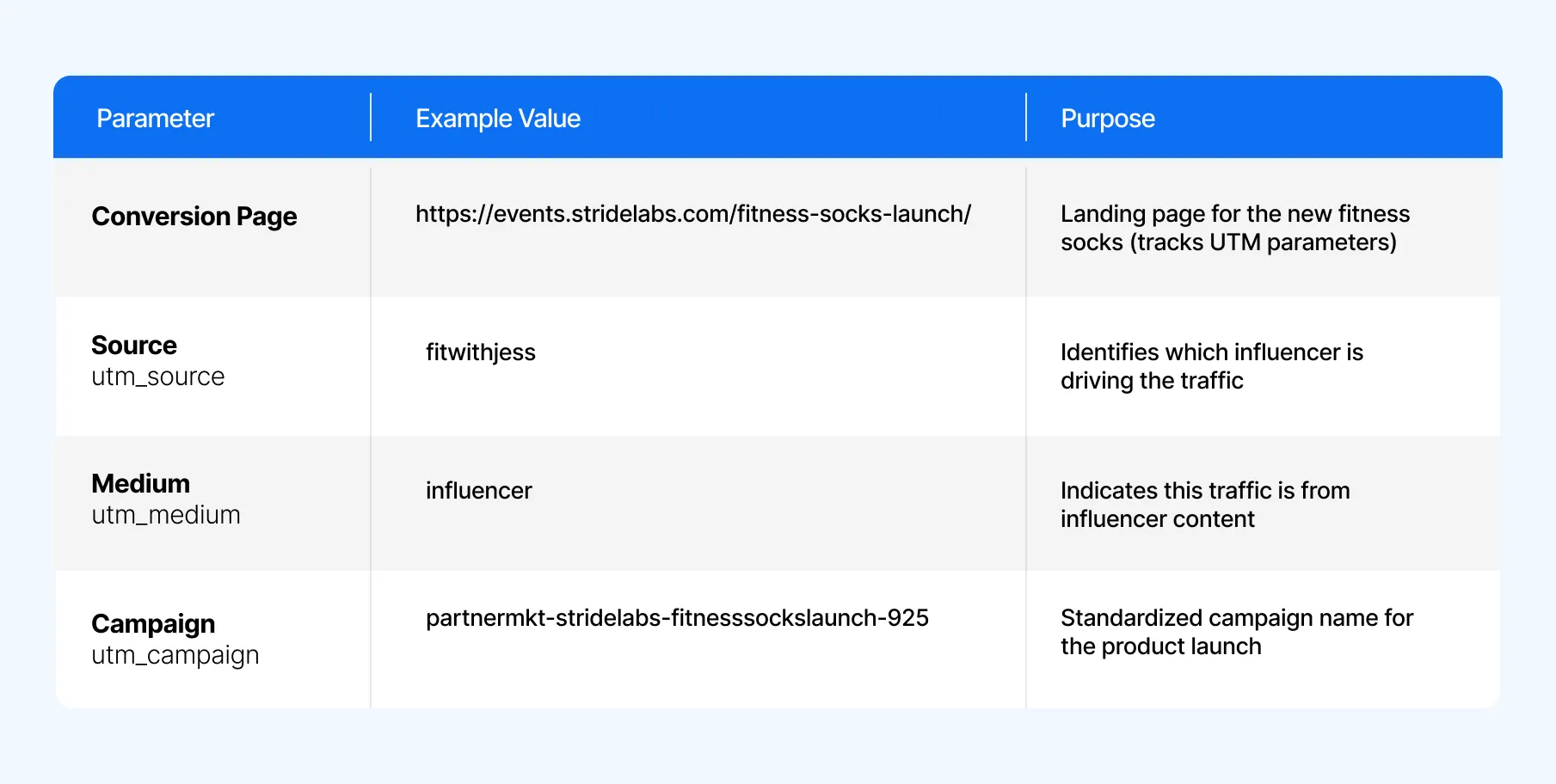
Let’s say you are a running shoe company called Stride Labs. Below are two use cases for your ecommerce and digital marketing efforts.
Example 1: Influencer Social Campaign
Stride Labs is partnering with several fitness influencers to promote a product launch – a new line of performance socks designed for runners and gym enthusiasts.
Each influencer gets a unique link to share in Instagram Stories, so Stride Labs can measure which partner drives the most sales.
To distinguish specific posts, platforms, or creative types, you can add a utm_content parameter. For example, “instagram_reel1”. This tells you which specific post drove the traffic.
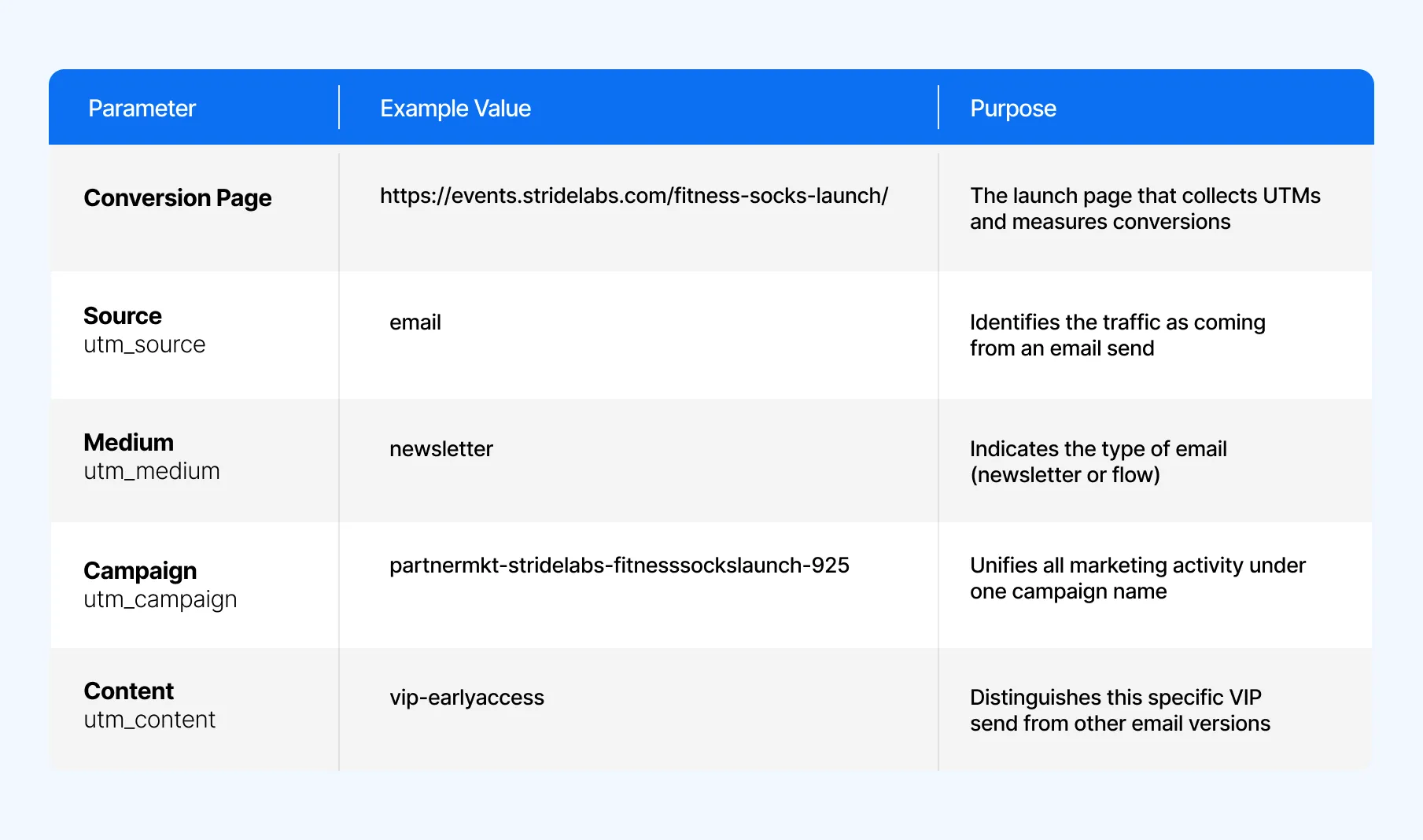
Example 2: Email Newsletter (VIP Pre-Launch Campaign)
Stride Labs sends a VIP early-access email to loyal customers, giving them exclusive first access to the new performance socks before the public launch.
The team wants to compare the email campaign’s performance against influencer-driven traffic.
Now that you know the UTM meaning, let’s go over best practices. We grabbed some expert tips to create and implement UTM tracking from Triple Whale’s Rev Ops Specialist, Kelly Sayegh.
Use Lowercase Only
Some platforms are case sensitive, which could mean all these examples would be considered different traffic sources:
trytriplewhale.com/?utm_source=AustinBillboard
trytriplewhale.com/?utm_source=Austinbillboard
trytriplewhale.com/?utm_source=austinbillboard
“My recommendation is to always use lowercases,” says Kelly, “so you don't need to remember the difference in letter case – for example email “small e” versus Email “big E” with each campaign.”
Be Consistent with Naming
Similar to the point above, try to decide on a syntax and naming convention. “I suggest you keep names short and clear,” says Kelly. “Some companies prefer to use internal codes/numbers like “1234567” and they know what campaign they are referring to,” she adds.
Avoid Using UTMs for Internal Links
UTMs should be used to track external traffic sources, not how visitors move within your site. Imagine someone scans a QR code at an event and lands on your demo form — perfect use of UTMs.
But if you add those same tracking links inside your website, like in pop-ups or guidebook CTAs, the system can overwrite the original source data and distort your analytics.
As Kelly Sayegh explains, “If we use tracking links directly on our website that aren’t related to the event, the system just collects what’s already there — and that muddies the data.”
How to View UTM Data
Ok, now you understand what UTMs are and what they do; how do you take all this theory and apply it to deploying paid media more efficiently and effectively? Great question.
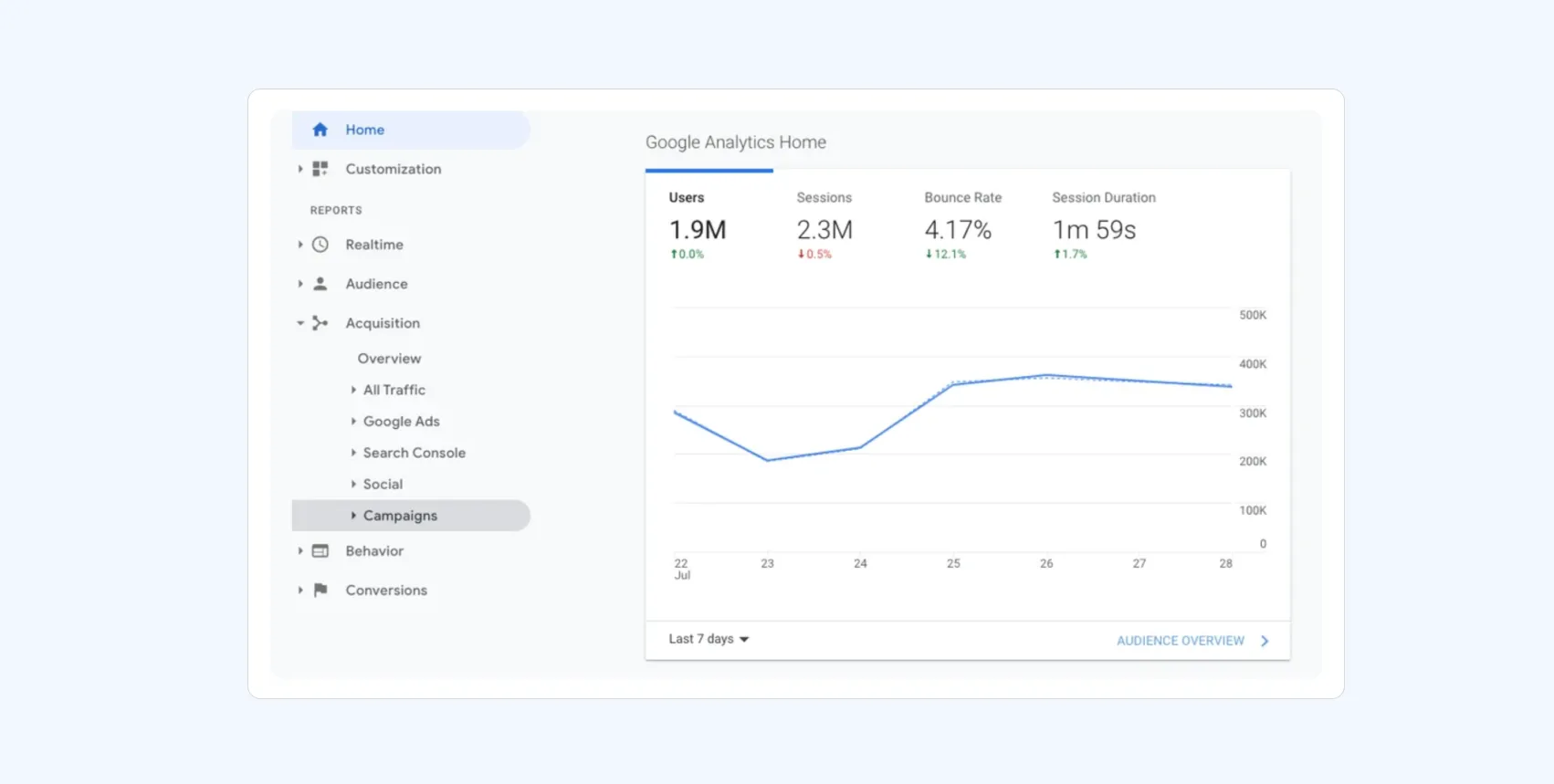
In Google Analytics
If your website already uses Google Analytics, it will automatically capture data from incoming campaigns. To view this information, go to Audience → Sources → Campaigns in your dashboard.
From there, you can click on each campaign to see detailed insights into its source and medium.
In Triple Whale
What you can do is match up the UTMs from your FB ads with your Google Analytics data. From that you can derive what FB says your performance is versus what GA says your performance is.
This method gives you another perspective on paid media performance at the campaign, ad set, and ad level; alleviating some of the visibility issues caused by Facebook’s current reporting.
One of two ways you can do this.
First, you go to Google Analytics and Facebook then crunch/reconcile all that UTM & performance data or…log into your Triple Whale 🐳.
Click on “Marketing”
Then “Attribution FB/GA”
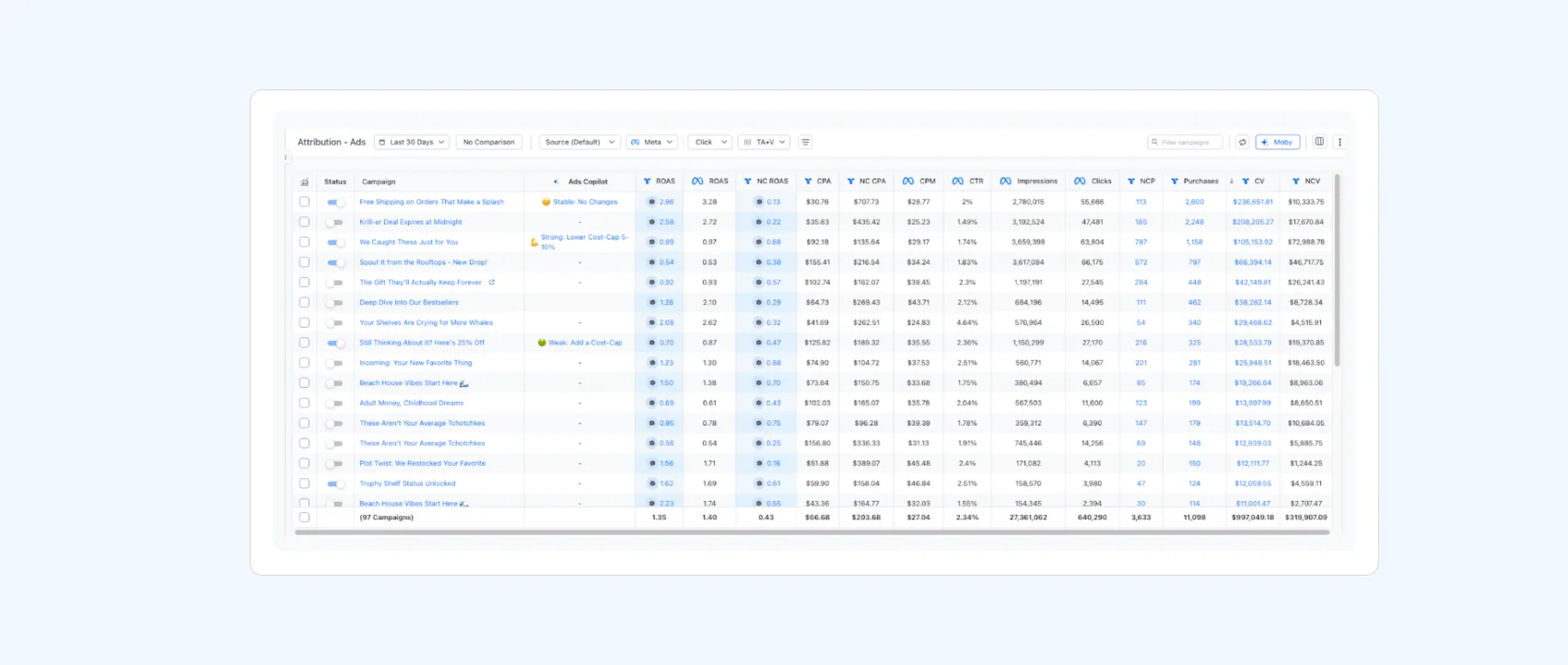
Here’s an example of Triple Whale’s Attribution Dashboard:
Once you’ve connected your UTMs to Triple Whale, your information is automatically pulled into the Attribution Dashboard, presented in a really clean and powerful way.
You can even add leading indicators like average session duration, bounce rate, pageviews per session, FB CPM, and FB CPC. You can see all the campaigns that are driving real dollars for your business.
Start Tracking Better Data
So that’s how UTMs work. UTM tracking gives you the clarity to see where your traffic comes from, how your campaigns perform, and which strategies actually drive results. Paired with tools like GA4 and Triple Whale, those insights turn into action so you can double down on what works. Ready to see it in action? Book a demo of Triple Whale today.
UTM FAQs
What’s the Difference Between UTMs and Tracking Pixels?
UTMs track where your traffic comes from by adding tags to URLs, helping you see which channels and campaigns drive visits. Pixels track what happens after the click, like page views, sign-ups, or purchases.
Do UTMs Affect SEO?
No, UTMs don’t affect SEO when used correctly. UTM parameters are designed purely for tracking and analytics, not for influencing search rankings.
Are UTMs Still Useful in GA4?
Yes, absolutely! GA4 explicitly supports the UTM parameters listed in this article.
Component Sales
5.32K
Benchmark your ecommerce brand against industry leaders
Without reliable tracking, even the most well-planned marketing campaigns can leave you guessing which initiatives are paying off. By using UTMs, you gain clear data that shows exactly where your traffic is coming from.
So let’s break down the exact meaning of UTMs in your marketing, plus everything you need to know when it comes to tracking, analyzing, and best practices.
What Is a UTM Code and How Does it Work?
UTM (Urchin Tracking Module) parameters, also called UTM tags or UTM codes, are small pieces of code suffixed to your URL to track the metrics and performance of a specific digital marketing campaign.
The name comes from the software company acquired by Google named; you guessed it, Urchin. Later, UTMs were deeply integrated into GA.
Outside of having an analytics platform like Google Analytics on your site or app, you don’t need to install anything else. Most tracking platforms work right out of the box with UTMs. However, for the UTM to function properly, logging both referral and cookie information is required.
Why are UTMs helpful? Because they allow you to easily “track” users’ behaviors using just a link. In general, UTMs help you answer three questions:
Where’s the traffic coming from?
How is it coming to me?
Why is it coming to me?
UTM Parameters Explained
There are many variables to the UTM link. Take a look at the screenshot below.
Here’s a list of UTM parameters below, plus a full breakdown to follow.
Source (utm_source)
The source parameter identifies where your traffic originates, helping you understand which platforms or partners are sending visitors to your site.
For example, you might use “google,” “linkedin,” or “event” to distinguish between different traffic sources.
Medium (utm_medium)
The medium parameter specifies the marketing channel or method used to reach your audience.
This could include “webinar,” “paid,” “cpc,” “banner,” or “social,” allowing you to compare performance across different types of marketing efforts.
Campaign (utm_campaign)
The campaign parameter labels a specific marketing campaign so you can measure its success across various platforms and content types.
For example, you might name it “mkt-whalies-hostedevent-525” to track engagement for a particular event or promotion.
Content (utm_content)
The content parameter is optional and helps differentiate between multiple versions of the same ad, email, or link.
It’s especially useful for A/B testing — for instance, using “button,” “banner,” or “textlinkA” to track which version performs best.
Term (utm_term)
The term parameter is also optional and primarily used in paid search campaigns to capture the specific keyword or phrase that triggered your ad, such as “shoes” or “crm software.”
Why UTM Tracking Matters for Attribution
There are many reasons why UTM tracking matters when it comes to marketing attribution.
Better Multi-Touch Attribution: UTM tracking ensures every marketing channel and campaign gets proper credit where credit’s due, showing exactly which touchpoints drive conversions.
Smarter Strategy: With clear visibility into what’s working, you can refine messaging, optimize targeting, and double down on high-performing tactics.
Efficient Spend: By identifying underperforming channels and wasted ad spend, UTM data helps reallocate budgets toward the campaigns that deliver the best ROI.
How to Create UTM Codes
There are many ways to create UTM codes. Use whatever is easiest for you and integrates into your workflows.
Facebook
Facebook has its own URL parameter builder right in Ads Manager. So let’s use that to create a UTM tagged link for your FB ad.
Set everything up at the campaign and ad set level; the URL Params live at the ad level. Then you can either enter the URL you want to promote or:
Click Build a URL parameter under Website URL and fill in the blanks.
Add the URL, Campaign, Source, and Medium information into their respective boxes.
Manually Creating UTM Codes
You can create your own system using a spreadsheet or a project management system such as Notion. Be sure to follow our best practices below if you take this route.
Using Triple Whale
We recommend you use Triple Whale's custom Tracking Parameters in your marketing content. In doing so, each visitor will be informing our Pixel exactly which ad they just clicked on before arriving at your store.
This allows for precise tracking of customer journeys, allowing you to optimize your marketing strategies based on real-time data, improve ad targeting, and maximize your return on investment.
UTM Tracking Use Cases for Ecommerce and Digital Marketing
So what is a UTM link in action? Let’s take a closer look.
Let’s say you are a running shoe company called Stride Labs. Below are two use cases for your ecommerce and digital marketing efforts.
Example 1: Influencer Social Campaign
Stride Labs is partnering with several fitness influencers to promote a product launch – a new line of performance socks designed for runners and gym enthusiasts.
Each influencer gets a unique link to share in Instagram Stories, so Stride Labs can measure which partner drives the most sales.
To distinguish specific posts, platforms, or creative types, you can add a utm_content parameter. For example, “instagram_reel1”. This tells you which specific post drove the traffic.
Example 2: Email Newsletter (VIP Pre-Launch Campaign)
Stride Labs sends a VIP early-access email to loyal customers, giving them exclusive first access to the new performance socks before the public launch.
The team wants to compare the email campaign’s performance against influencer-driven traffic.
Now that you know the UTM meaning, let’s go over best practices. We grabbed some expert tips to create and implement UTM tracking from Triple Whale’s Rev Ops Specialist, Kelly Sayegh.
Use Lowercase Only
Some platforms are case sensitive, which could mean all these examples would be considered different traffic sources:
trytriplewhale.com/?utm_source=AustinBillboard
trytriplewhale.com/?utm_source=Austinbillboard
trytriplewhale.com/?utm_source=austinbillboard
“My recommendation is to always use lowercases,” says Kelly, “so you don't need to remember the difference in letter case – for example email “small e” versus Email “big E” with each campaign.”
Be Consistent with Naming
Similar to the point above, try to decide on a syntax and naming convention. “I suggest you keep names short and clear,” says Kelly. “Some companies prefer to use internal codes/numbers like “1234567” and they know what campaign they are referring to,” she adds.
Avoid Using UTMs for Internal Links
UTMs should be used to track external traffic sources, not how visitors move within your site. Imagine someone scans a QR code at an event and lands on your demo form — perfect use of UTMs.
But if you add those same tracking links inside your website, like in pop-ups or guidebook CTAs, the system can overwrite the original source data and distort your analytics.
As Kelly Sayegh explains, “If we use tracking links directly on our website that aren’t related to the event, the system just collects what’s already there — and that muddies the data.”
How to View UTM Data
Ok, now you understand what UTMs are and what they do; how do you take all this theory and apply it to deploying paid media more efficiently and effectively? Great question.
In Google Analytics
If your website already uses Google Analytics, it will automatically capture data from incoming campaigns. To view this information, go to Audience → Sources → Campaigns in your dashboard.
From there, you can click on each campaign to see detailed insights into its source and medium.
In Triple Whale
What you can do is match up the UTMs from your FB ads with your Google Analytics data. From that you can derive what FB says your performance is versus what GA says your performance is.
This method gives you another perspective on paid media performance at the campaign, ad set, and ad level; alleviating some of the visibility issues caused by Facebook’s current reporting.
One of two ways you can do this.
First, you go to Google Analytics and Facebook then crunch/reconcile all that UTM & performance data or…log into your Triple Whale 🐳.
Click on “Marketing”
Then “Attribution FB/GA”
Here’s an example of Triple Whale’s Attribution Dashboard:
Once you’ve connected your UTMs to Triple Whale, your information is automatically pulled into the Attribution Dashboard, presented in a really clean and powerful way.
You can even add leading indicators like average session duration, bounce rate, pageviews per session, FB CPM, and FB CPC. You can see all the campaigns that are driving real dollars for your business.
Start Tracking Better Data
So that’s how UTMs work. UTM tracking gives you the clarity to see where your traffic comes from, how your campaigns perform, and which strategies actually drive results. Paired with tools like GA4 and Triple Whale, those insights turn into action so you can double down on what works. Ready to see it in action? Book a demo of Triple Whale today.
UTM FAQs
What’s the Difference Between UTMs and Tracking Pixels?
UTMs track where your traffic comes from by adding tags to URLs, helping you see which channels and campaigns drive visits. Pixels track what happens after the click, like page views, sign-ups, or purchases.
Do UTMs Affect SEO?
No, UTMs don’t affect SEO when used correctly. UTM parameters are designed purely for tracking and analytics, not for influencing search rankings.
Are UTMs Still Useful in GA4?
Yes, absolutely! GA4 explicitly supports the UTM parameters listed in this article.
Share
Kaleena Stroud
Kaleena Stroud is a copywriter for SaaS and DTC businesses.
Kaleena Stroud
Kaleena Stroud is a content writer at Triple Whale, bringing data stories to life. She spent many years running an online copywriting business, where she helped brands launch and revamp their Shopify stores. Her work has been featured in Practical Ecommerce, Convert, and Create & Cultivate.
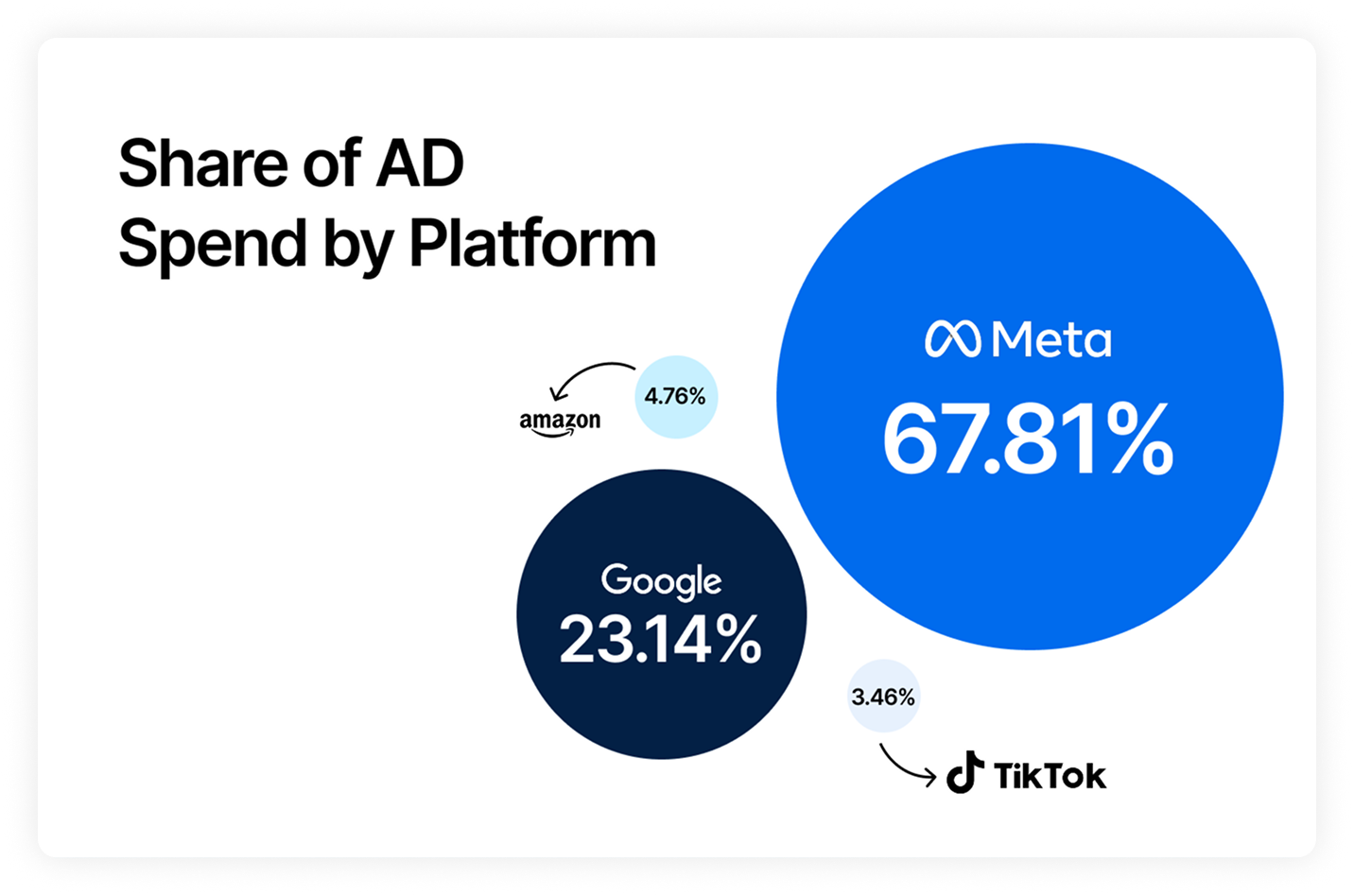
Body Copy: The following benchmarks compare advertising metrics from April 1-17 to the previous period. Considering President Trump first unveiled his tariffs on April 2, the timing corresponds with potential changes in advertising behavior among ecommerce brands (though it isn’t necessarily correlated).


 Moby AIAsk questions, analyze performance, and work with your business context.
 ActionsTake governed action across the tools that run your business.
 AutomationsSchedule recurring analysis and work that runs on your terms.
 Landing PagesCreative conversion-focused ecommerce pages with Moby.
 Creative StudioGenerate and refine creative grounded in your brand.


.webp)









.webp)

.webp)
