The success of your advertising depends on data, the signals that allow platforms like Meta to understand customer acquisition — who they are, what actions they take, and which ads drive revenue.
If you’ve heard the term Facebook CAPI or Meta Conversions API and felt lost, you’re not alone. As browser-based tracking becomes less reliable, advertisers are being pushed toward server-side tracking and first-party data solutions. In this guide, we’ll break down exactly what Facebook CAPI is, how it works, and why it matters for Facebook ad performance in a cookieless future.
What Is Facebook CAPI?
Facebook CAPI stands for Conversions API, Meta’s server-side tracking solution.
It’s a powerful marketing enablement tool that helps brands track and optimize their marketing efforts on the social media platform.
Facebook CAPI allows advertisers to send:
Website conversions
Offline conversions
CRM and subscription events
Post-purchase and lifecycle actions
All while relying on first-party data rather than third-party cookies. These events appear in Meta Ads Manager and Events Manager just like Pixel events, supporting the same attribution, reporting, and optimization workflows.
Why Do I Need Facebook CAPI?
Early Facebook Ads relied on basic demographic and interest targeting. As advertising matured, Meta rolled out the Facebook Pixel in 2013, enabling retargeting, lookalike audiences, and closed-loop conversion tracking.
The Facebook Pixel was wildly successful, until the rise of ad blockers, browser privacy features, and mobile operating system updates steadily reduced the reliability of client-side tracking.
Privacy and Platform Changes Driving Signal Loss
Apple’s App Tracking Transparency (ATT) requires explicit user opt-in for cross-app tracking. Since most users opt out, Meta lost visibility into a significant portion of mobile conversion activity.
Apple expanded privacy controls further by stripping known tracking parameters (like fbclid) from links in Mail, Messages, and private browsing. This makes browser-based click-to-conversion matching less reliable.
In response, Meta introduced Aggregated Event Measurement and broader enforcement and aggregation controls to comply with privacy requirements. These changes limit:
How many events can be prioritized
Which conversions can be attributed post-opt-out
How much user-level detail advertisers receive
Google’s move away from third-party cookies reinforces the same trend. While timelines continue to shift, browser-based tracking across the open web will continue to lose fidelity.
Facebook CAPI was created in response to these changes by allowing businesses to share conversion data directly from their server. That data is then transferred to Meta and handled similarly to Pixel events — but without relying on the browser.
Together, these changes significantly reduce the reliability of browser-based tracking across platforms.
So, where does the end user provide consent?
User consent is still collected on your website or app. Once recorded, consent and data-processing flags — such as Limited Data Use (LDU) — are passed to Meta through the Conversions API.
Meta then automatically applies the appropriate restrictions based on the user’s preferences and regional privacy requirements.
What’s the Difference Between Facebook CAPI and Meta Pixel?
The Facebook Pixel (now also referred to as Meta Pixel) is a small piece of code placed on an advertiser’s website that sends customer events back to Meta using browser-based tracking.
Facebook CAPI and Meta Pixel are used for the same outcomes — conversion tracking, optimization, and reporting — and they follow the same platform controls.
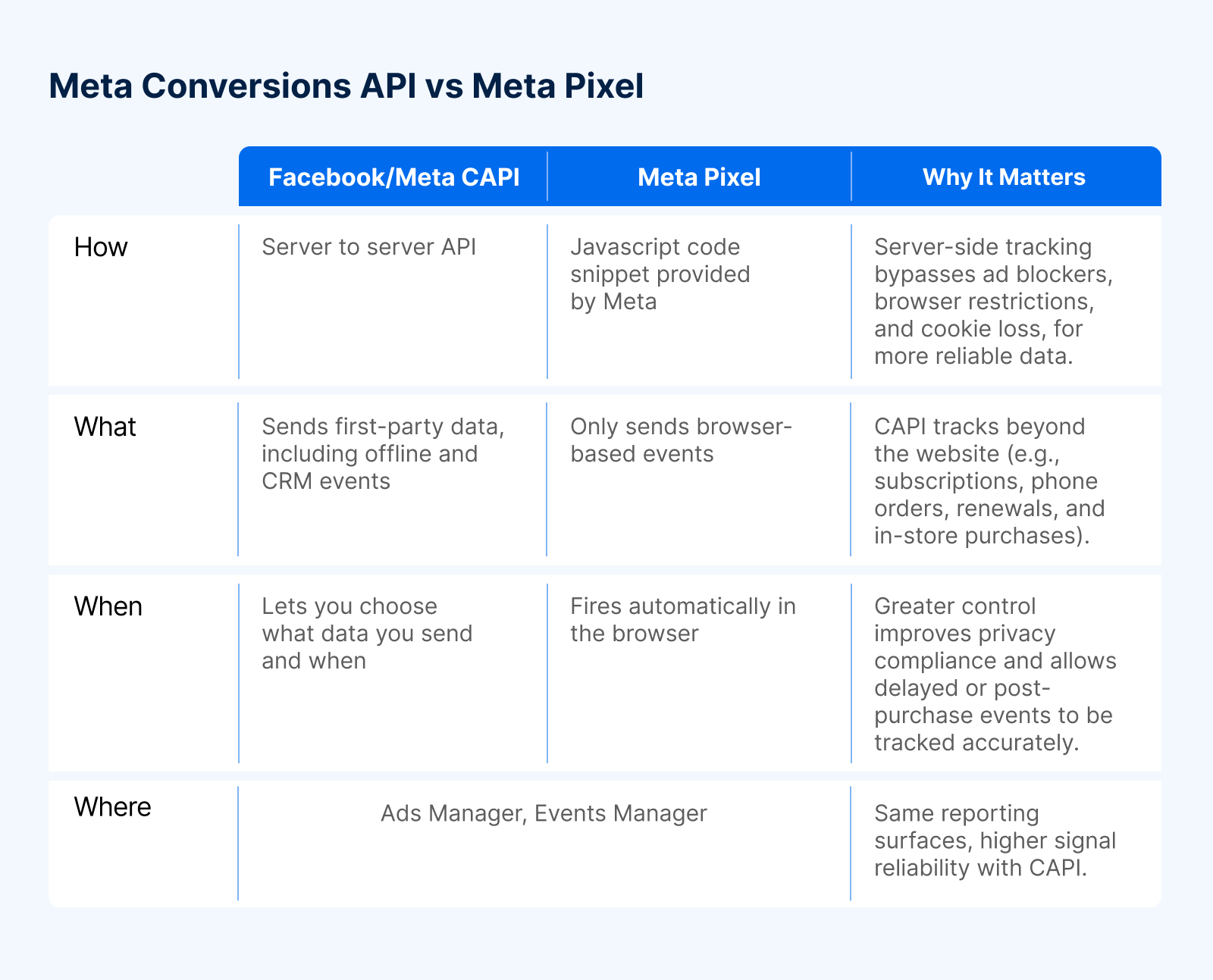
The key difference is how the data is sent. The Pixel relies on the browser, which is increasingly restricted. Facebook CAPI sends conversion data server to server, bypassing browser limitations.
For a quick breakdown of differences, see the table below.
It’s important to note that the two should not be pitted against each other. Facebook encourages you to implement Conversions API in addition to Pixel for optimal full-funnel tracking and reliable data sharing.
How Does Facebook CAPI Work?
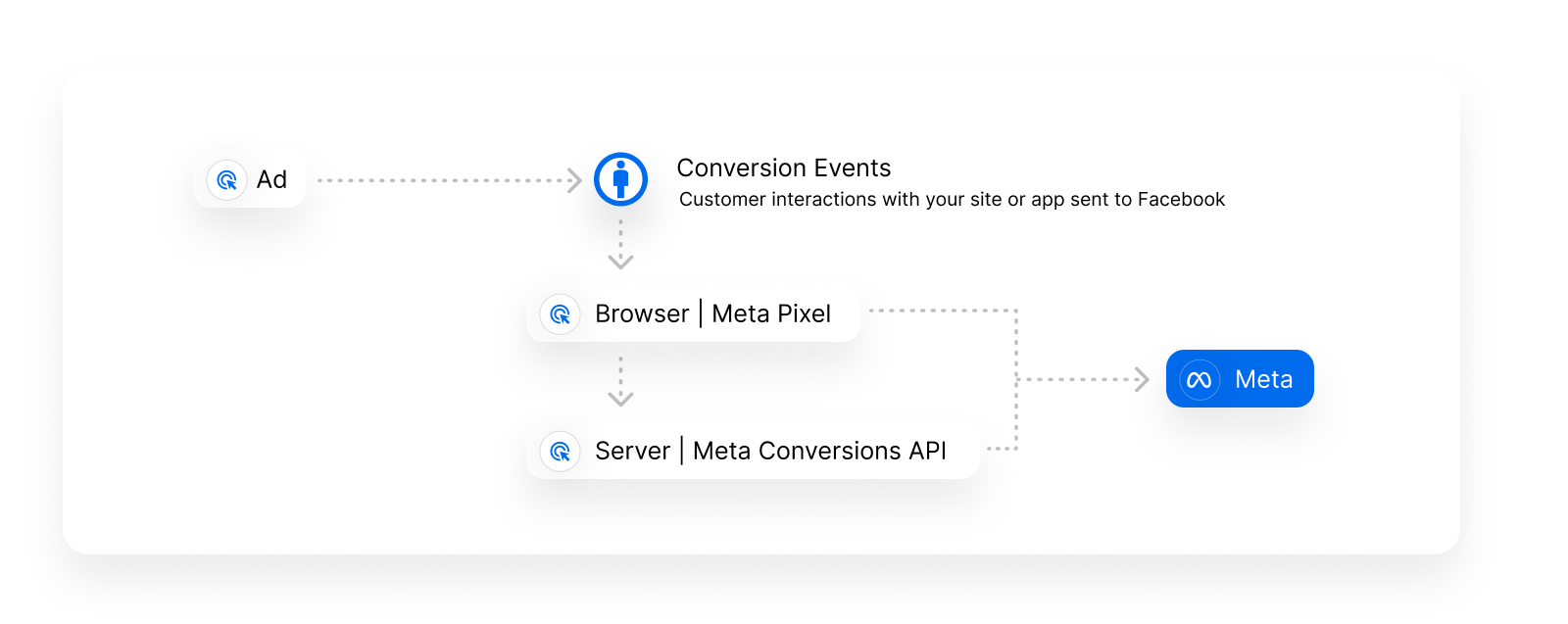
The Conversions API works by creating a direct connection between your marketing data and Meta.
Your server uses existing first-party data such as IP addresses, user agents, hashed identifiers, and analytics parameters to construct conversion events.
For example, let’s say someone’s customer journey is as follows: The user is browsing on Facebook, then clicks on a Facebook Ad of your e-commerce website, and makes a purchase on your site.
Your conversion tracking server captures the user ID, timestamp, item purchased and revenue of this event.
This purchase conversion data will then be sent to Facebook via Conversions API.
Facebook then will attribute this purchase conversion to the previous Facebook Ad that the user had already clicked.
Some of the Facebook conversion API events list include:
Leads
Phone calls
Form submissions
Purchases
Email subscriptions
Subscription changes
What Are the Benefits of Facebook CAPI?
Facebook CAPI helps you send more reliable, privacy-safe conversion data directly from your server which will provide the following benefits.
Privacy and consent control: Decide exactly what data is sent, when it’s sent, and under what consent conditions.
Stronger first-party data: Send conversion data you own directly to Meta without relying on third-party cookies.
Reduced signal loss: Capture conversions even when browsers block cookies, scripts, or tracking pixels.
Offline and post-purchase tracking: Attribute phone sales, subscriptions, renewals, and in-store conversions.
Improved attribution accuracy: Match conversions to ads across devices and sessions more reliably.
Built-in backup: If the Pixel fails or is blocked, CAPI still records the conversion.
Rich conversion metadata: Send revenue, item-level data, and custom parameters for better optimization.
What Are Facebook CAPI Best Practices?
Following Facebook CAPI best practices ensures accurate attribution, strong optimization signals, and long-term reliability as privacy restrictions continue to evolve.
Run CAPI alongside the Meta Pixel: Using both together allows for event deduplication, redundancy, and maximum coverage across browser and server-side environments.
Prioritize high-quality first-party identifiers: Hashed email addresses, phone numbers, IP addresses, and user agents significantly improve Event Match Quality and attribution accuracy.
Focus on lower-funnel and lifecycle events: Prioritize purchases, subscriptions, renewals, and post-purchase actions to give Meta the signals it needs to optimize for revenue, not just clicks.
Implement proper event deduplication: Use a shared event_id between Pixel and CAPI events to avoid double-counting conversions.
Respect user consent and privacy flags: Pass consent signals and data processing options so Meta applies the correct restrictions automatically.
Common Mistakes to Avoid
Even well-intentioned Facebook CAPI implementations can underperform if these issues aren’t addressed.
Over-sending unnecessary events: Flooding Meta with low-value or redundant events can dilute optimization signals.
Not testing after implementation: Many issues only surface in Events Manager and Ads Manager once campaigns are live.
Treating implementation as “set it and forget it”: Platform updates, privacy changes, and site updates require ongoing monitoring and maintenance.
How to Implement Facebook CAPI
Facebook Conversion API setup doesn’t have to be overly technical. There are two main paths depending on your resources.
Before implementing Facebook CAPI, you’ll need:
Meta Business Manager: Required to manage assets, permissions, and access to the Conversions API.
An active Meta Pixel: Used for event deduplication and recommended to run alongside CAPI for full-funnel coverage.
A Meta App connected to Business Manager: This app enables secure server-to-server communication with Meta and is required for Conversions API access.
Installing the Meta Pixel (Required for Deduplication)
While Facebook CAPI can send server-side events independently, Meta recommends running CAPI alongside the Meta Pixel to enable event deduplication and maximize signal coverage.
Deduplication is just Meta’s process to make sure the same conversion event sent by both the Meta Pixel and Conversions API is counted only once.
Shopify
For Shopify stores, the Meta Pixel is installed and managed through the Facebook & Instagram by Meta app. This app automatically:
Connects your Meta Pixel to Shopify
Handles standard event tracking
Supports native Conversions API integration
Manual pixel installation through Shopify theme files or Preferences is no longer recommended.
WooCommerce
For WooCommerce stores, the Meta Pixel is typically installed using the Facebook for WooCommerce plugin. This plugin:
Connects your site to Meta
Automatically installs the Meta Pixel
Supports Conversions API configuration
Handles event tracking and deduplication
Option 1: Manual Implementation
Manual implementation requires building and maintaining your own server-side pipeline.
This includes:
Creating a Meta App in Business Manager
Managing access tokens
Building event logic and payloads
Handling consent flags, deduplication, and hashing (encrypting personal data before it’s sent to Meta)
Manual setups provide flexibility but require continuous upkeep.
Option 2: Partner Integration
Partner integrations abstract away the complexity of server-side tracking.
This approach typically includes:
Pre-built Meta integrations
Automatic event enrichment
Deduplication with Pixel
Ongoing maintenance as Meta requirements evolve
This option is commonly used by ecommerce brands and agencies without dedicated engineering teams.
What Events to Send (and What Matters Most)
To get the most value from Facebook CAPI, focus on sending a small set of high-impact events paired with strong first-party identifiers. Higher-quality identifiers lead to better Event Match Quality and stronger optimization signals.
Core events most advertisers should send include:
PageView
ViewContent
AddToCart
InitiateCheckout
Purchase
High-impact parameters include:
Hashed email and phone number
IP address and user agent
Event ID for deduplication
Purchase value, currency, and item data
Your Validation Checklist
After you've installed the Facebook Pixel on your store, it's important to test it to make sure it's working properly. You can do this by using the Facebook Pixel Helper, a free tool that allows you to test the Facebook Pixel on your website.
Before relying on CAPI data, you can also:
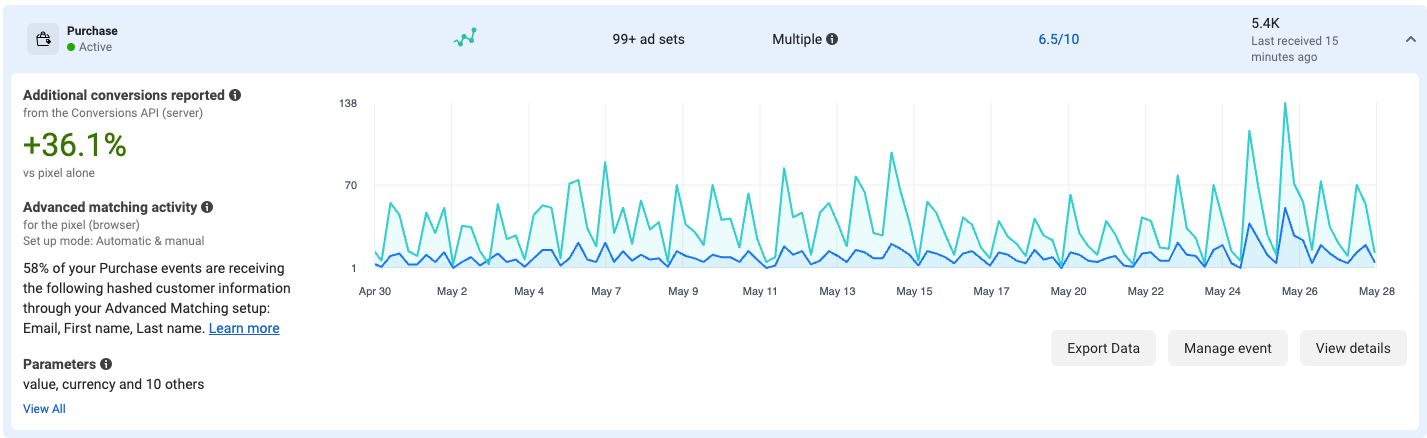
Verify events in Meta Events Manager
Confirm deduplication with Pixel events
Monitor Event Match Quality scores
Validate consent and privacy flags
Compare reported vs actual conversions
Test across devices and browsers
Sonar: Triple Whale’s Enriched Data for Better Ad Performance
Ad platforms can only optimize based on the data they receive. Sonar enriches your first-party data and sends it back to Meta through Facebook CAPI, creating a smarter feedback loop for targeting, attribution, and ROAS.
Brands like Ampersand use Sonar to recover performance after iOS-driven signal loss, improving Meta attribution and campaign efficiency.
Tackle a Cookieless Future with Triple Whale
iOS privacy updates, browser restrictions, and platform-level changes have permanently reduced the reliability of pixel-only tracking. Facebook CAPI offers a durable, privacy-compliant way forward.
Triple Whale’s Sonar makes CAPI accessible, powerful, and actionable — without heavy engineering lift. Demo Triple Whale today.
Meta CAPI FAQs
What is Conversions API?
Conversions API (CAPI) is Meta’s server-side tracking solution that sends conversion events directly from a business’s server to Meta, using first-party data instead of relying on browser-based cookies.
What is the difference between Meta CAPI and Pixel?
The Meta Pixel sends conversion data from the user’s browser using cookies, while Meta CAPI sends the same types of events server-to-server.
Does CAPI replace the Pixel?
No, Meta recommends using CAPI alongside the Pixel.
Is CAPI compliant with GDPR/CCPA?
Yes, Facebook CAPI supports GDPR and CCPA compliance when implemented correctly, as advertisers control what data is sent and can pass consent and data-processing flags that allow Meta to apply the appropriate restrictions.
Component Sales
5.32K
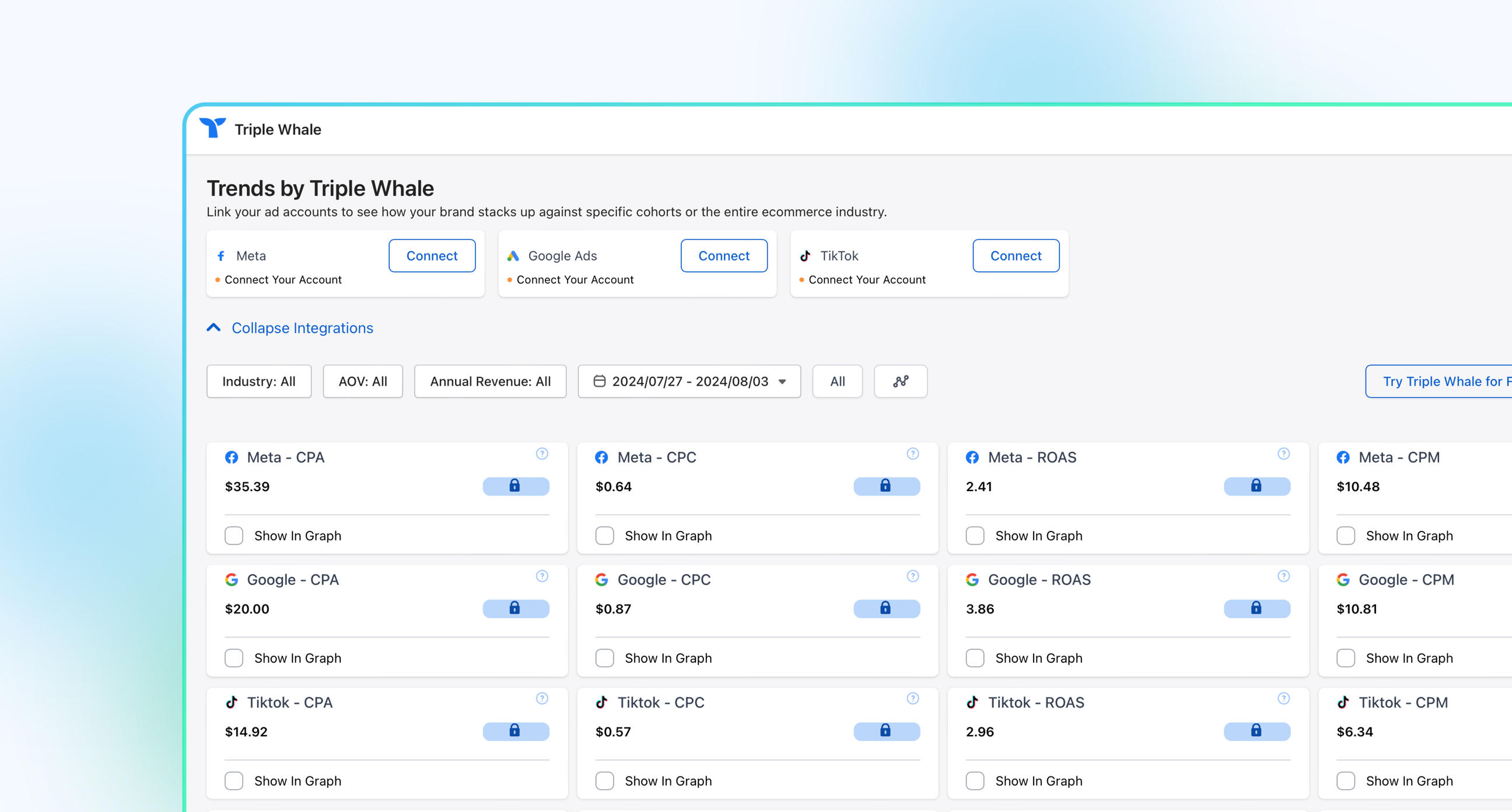
Benchmark your ecommerce brand against industry leaders
The success of your advertising depends on data, the signals that allow platforms like Meta to understand customer acquisition — who they are, what actions they take, and which ads drive revenue.
If you’ve heard the term Facebook CAPI or Meta Conversions API and felt lost, you’re not alone. As browser-based tracking becomes less reliable, advertisers are being pushed toward server-side tracking and first-party data solutions. In this guide, we’ll break down exactly what Facebook CAPI is, how it works, and why it matters for Facebook ad performance in a cookieless future.
What Is Facebook CAPI?
Facebook CAPI stands for Conversions API, Meta’s server-side tracking solution.
It’s a powerful marketing enablement tool that helps brands track and optimize their marketing efforts on the social media platform.
Facebook CAPI allows advertisers to send:
Website conversions
Offline conversions
CRM and subscription events
Post-purchase and lifecycle actions
All while relying on first-party data rather than third-party cookies. These events appear in Meta Ads Manager and Events Manager just like Pixel events, supporting the same attribution, reporting, and optimization workflows.
Why Do I Need Facebook CAPI?
Early Facebook Ads relied on basic demographic and interest targeting. As advertising matured, Meta rolled out the Facebook Pixel in 2013, enabling retargeting, lookalike audiences, and closed-loop conversion tracking.
The Facebook Pixel was wildly successful, until the rise of ad blockers, browser privacy features, and mobile operating system updates steadily reduced the reliability of client-side tracking.
Privacy and Platform Changes Driving Signal Loss
Apple’s App Tracking Transparency (ATT) requires explicit user opt-in for cross-app tracking. Since most users opt out, Meta lost visibility into a significant portion of mobile conversion activity.
Apple expanded privacy controls further by stripping known tracking parameters (like fbclid) from links in Mail, Messages, and private browsing. This makes browser-based click-to-conversion matching less reliable.
In response, Meta introduced Aggregated Event Measurement and broader enforcement and aggregation controls to comply with privacy requirements. These changes limit:
How many events can be prioritized
Which conversions can be attributed post-opt-out
How much user-level detail advertisers receive
Google’s move away from third-party cookies reinforces the same trend. While timelines continue to shift, browser-based tracking across the open web will continue to lose fidelity.
Facebook CAPI was created in response to these changes by allowing businesses to share conversion data directly from their server. That data is then transferred to Meta and handled similarly to Pixel events — but without relying on the browser.
Together, these changes significantly reduce the reliability of browser-based tracking across platforms.
So, where does the end user provide consent?
User consent is still collected on your website or app. Once recorded, consent and data-processing flags — such as Limited Data Use (LDU) — are passed to Meta through the Conversions API.
Meta then automatically applies the appropriate restrictions based on the user’s preferences and regional privacy requirements.
What’s the Difference Between Facebook CAPI and Meta Pixel?
The Facebook Pixel (now also referred to as Meta Pixel) is a small piece of code placed on an advertiser’s website that sends customer events back to Meta using browser-based tracking.
Facebook CAPI and Meta Pixel are used for the same outcomes — conversion tracking, optimization, and reporting — and they follow the same platform controls.
The key difference is how the data is sent. The Pixel relies on the browser, which is increasingly restricted. Facebook CAPI sends conversion data server to server, bypassing browser limitations.
For a quick breakdown of differences, see the table below.
It’s important to note that the two should not be pitted against each other. Facebook encourages you to implement Conversions API in addition to Pixel for optimal full-funnel tracking and reliable data sharing.
How Does Facebook CAPI Work?
The Conversions API works by creating a direct connection between your marketing data and Meta.
Your server uses existing first-party data such as IP addresses, user agents, hashed identifiers, and analytics parameters to construct conversion events.
For example, let’s say someone’s customer journey is as follows: The user is browsing on Facebook, then clicks on a Facebook Ad of your e-commerce website, and makes a purchase on your site.
Your conversion tracking server captures the user ID, timestamp, item purchased and revenue of this event.
This purchase conversion data will then be sent to Facebook via Conversions API.
Facebook then will attribute this purchase conversion to the previous Facebook Ad that the user had already clicked.
Some of the Facebook conversion API events list include:
Leads
Phone calls
Form submissions
Purchases
Email subscriptions
Subscription changes
What Are the Benefits of Facebook CAPI?
Facebook CAPI helps you send more reliable, privacy-safe conversion data directly from your server which will provide the following benefits.
Privacy and consent control: Decide exactly what data is sent, when it’s sent, and under what consent conditions.
Stronger first-party data: Send conversion data you own directly to Meta without relying on third-party cookies.
Reduced signal loss: Capture conversions even when browsers block cookies, scripts, or tracking pixels.
Offline and post-purchase tracking: Attribute phone sales, subscriptions, renewals, and in-store conversions.
Improved attribution accuracy: Match conversions to ads across devices and sessions more reliably.
Built-in backup: If the Pixel fails or is blocked, CAPI still records the conversion.
Rich conversion metadata: Send revenue, item-level data, and custom parameters for better optimization.
What Are Facebook CAPI Best Practices?
Following Facebook CAPI best practices ensures accurate attribution, strong optimization signals, and long-term reliability as privacy restrictions continue to evolve.
Run CAPI alongside the Meta Pixel: Using both together allows for event deduplication, redundancy, and maximum coverage across browser and server-side environments.
Prioritize high-quality first-party identifiers: Hashed email addresses, phone numbers, IP addresses, and user agents significantly improve Event Match Quality and attribution accuracy.
Focus on lower-funnel and lifecycle events: Prioritize purchases, subscriptions, renewals, and post-purchase actions to give Meta the signals it needs to optimize for revenue, not just clicks.
Implement proper event deduplication: Use a shared event_id between Pixel and CAPI events to avoid double-counting conversions.
Respect user consent and privacy flags: Pass consent signals and data processing options so Meta applies the correct restrictions automatically.
Common Mistakes to Avoid
Even well-intentioned Facebook CAPI implementations can underperform if these issues aren’t addressed.
Over-sending unnecessary events: Flooding Meta with low-value or redundant events can dilute optimization signals.
Not testing after implementation: Many issues only surface in Events Manager and Ads Manager once campaigns are live.
Treating implementation as “set it and forget it”: Platform updates, privacy changes, and site updates require ongoing monitoring and maintenance.
How to Implement Facebook CAPI
Facebook Conversion API setup doesn’t have to be overly technical. There are two main paths depending on your resources.
Before implementing Facebook CAPI, you’ll need:
Meta Business Manager: Required to manage assets, permissions, and access to the Conversions API.
An active Meta Pixel: Used for event deduplication and recommended to run alongside CAPI for full-funnel coverage.
A Meta App connected to Business Manager: This app enables secure server-to-server communication with Meta and is required for Conversions API access.
Installing the Meta Pixel (Required for Deduplication)
While Facebook CAPI can send server-side events independently, Meta recommends running CAPI alongside the Meta Pixel to enable event deduplication and maximize signal coverage.
Deduplication is just Meta’s process to make sure the same conversion event sent by both the Meta Pixel and Conversions API is counted only once.
Shopify
For Shopify stores, the Meta Pixel is installed and managed through the Facebook & Instagram by Meta app. This app automatically:
Connects your Meta Pixel to Shopify
Handles standard event tracking
Supports native Conversions API integration
Manual pixel installation through Shopify theme files or Preferences is no longer recommended.
WooCommerce
For WooCommerce stores, the Meta Pixel is typically installed using the Facebook for WooCommerce plugin. This plugin:
Connects your site to Meta
Automatically installs the Meta Pixel
Supports Conversions API configuration
Handles event tracking and deduplication
Option 1: Manual Implementation
Manual implementation requires building and maintaining your own server-side pipeline.
This includes:
Creating a Meta App in Business Manager
Managing access tokens
Building event logic and payloads
Handling consent flags, deduplication, and hashing (encrypting personal data before it’s sent to Meta)
Manual setups provide flexibility but require continuous upkeep.
Option 2: Partner Integration
Partner integrations abstract away the complexity of server-side tracking.
This approach typically includes:
Pre-built Meta integrations
Automatic event enrichment
Deduplication with Pixel
Ongoing maintenance as Meta requirements evolve
This option is commonly used by ecommerce brands and agencies without dedicated engineering teams.
What Events to Send (and What Matters Most)
To get the most value from Facebook CAPI, focus on sending a small set of high-impact events paired with strong first-party identifiers. Higher-quality identifiers lead to better Event Match Quality and stronger optimization signals.
Core events most advertisers should send include:
PageView
ViewContent
AddToCart
InitiateCheckout
Purchase
High-impact parameters include:
Hashed email and phone number
IP address and user agent
Event ID for deduplication
Purchase value, currency, and item data
Your Validation Checklist
After you've installed the Facebook Pixel on your store, it's important to test it to make sure it's working properly. You can do this by using the Facebook Pixel Helper, a free tool that allows you to test the Facebook Pixel on your website.
Before relying on CAPI data, you can also:
Verify events in Meta Events Manager
Confirm deduplication with Pixel events
Monitor Event Match Quality scores
Validate consent and privacy flags
Compare reported vs actual conversions
Test across devices and browsers
Sonar: Triple Whale’s Enriched Data for Better Ad Performance
Ad platforms can only optimize based on the data they receive. Sonar enriches your first-party data and sends it back to Meta through Facebook CAPI, creating a smarter feedback loop for targeting, attribution, and ROAS.
Brands like Ampersand use Sonar to recover performance after iOS-driven signal loss, improving Meta attribution and campaign efficiency.
Tackle a Cookieless Future with Triple Whale
iOS privacy updates, browser restrictions, and platform-level changes have permanently reduced the reliability of pixel-only tracking. Facebook CAPI offers a durable, privacy-compliant way forward.
Triple Whale’s Sonar makes CAPI accessible, powerful, and actionable — without heavy engineering lift. Demo Triple Whale today.
Meta CAPI FAQs
What is Conversions API?
Conversions API (CAPI) is Meta’s server-side tracking solution that sends conversion events directly from a business’s server to Meta, using first-party data instead of relying on browser-based cookies.
What is the difference between Meta CAPI and Pixel?
The Meta Pixel sends conversion data from the user’s browser using cookies, while Meta CAPI sends the same types of events server-to-server.
Does CAPI replace the Pixel?
No, Meta recommends using CAPI alongside the Pixel.
Is CAPI compliant with GDPR/CCPA?
Yes, Facebook CAPI supports GDPR and CCPA compliance when implemented correctly, as advertisers control what data is sent and can pass consent and data-processing flags that allow Meta to apply the appropriate restrictions.
Share
Kaleena Stroud
Kaleena Stroud is a copywriter for SaaS and DTC businesses.
Kaleena Stroud
Kaleena Stroud is a content writer at Triple Whale, bringing data stories to life. She spent many years running an online copywriting business, where she helped brands launch and revamp their Shopify stores. Her work has been featured in Practical Ecommerce, Convert, and Create & Cultivate.
Body Copy: The following benchmarks compare advertising metrics from April 1-17 to the previous period. Considering President Trump first unveiled his tariffs on April 2, the timing corresponds with potential changes in advertising behavior among ecommerce brands (though it isn’t necessarily correlated).


 Moby AIAsk questions, analyze performance, and work with your business context.
 ActionsTake governed action across the tools that run your business.
 AutomationsSchedule recurring analysis and work that runs on your terms.
 Landing PagesCreative conversion-focused ecommerce pages with Moby.
 Creative StudioGenerate and refine creative grounded in your brand.












.webp)

.webp)
